





Tips Index
macOS has been very successful in creating an operating system that can stand alone without any consortium to another tech OS behemoth such as Windows. Just like android OS, they have been also successful in adopting and pioneering apps like Instagram before making them pretty exclusive at that time. Some of the elite apps with a smooth and minimal interface appealed to the public so much that some of them can only be found in macOS and gaining a better ground against other tech systems along the way. The problem is that the macOS restrictive system doesn’t allow other apps to run on their array of devices. It’s a successful business scheme for Apple to do this since they can finally have their own player and downloader app especially when it comes to music like iTunes. Apple users still need to buy credit to iTunes or iTV to buy music or movies in this case. But somehow people will always find a loophole to this issue.
One of the available software in the Apple store is Clipgrab. Clipgrab is a downloading and converting software compatible with both Apple and Windows operating systems. Since Apple products have a varying size of display especially when it comes to phone and tablet models it is more justifiable than the resolution of clips to be downloaded must be of compatible format or at least the clip must be converted into the peak resolution to obtain a high-quality playback to the device.
One of the clipgrab like programs is VideoPower RED, powerful software that downloads and converts video and operates in Windows. In a simple way it can be the “Clipgrab” of Windows, but way better.
Although Clipgrab and VideoPower RED are both video downloader apps that have almost the same function, VideoPower RED still holds its own as it has a dedicated editing tool within its interface.
Method 1: Copy and Paste
Step 1: Copy and Paste the URL and download the video.
Open the video website that contains the video you desire to download. For this example, Youtube. Copy the link of the video. Open VideoPower RED and paste the link at “Paste the URL” button. The download will start automatically.

Step 2: Check the downloaded file.
When the download process has been done, the file will be transferred to the completed downloads list right at the bottom of the downloading list. Right-click to do more operations and double-click to preview.

Notice that the default format is converted automatically to MP4.
Method 2: Screen Record the YouTube video
For people in areas with a slow internet connection, you may opt to use the record function instead. This method is also best for protected files that cannot be downloaded.
Step 1: Set Recording Mode
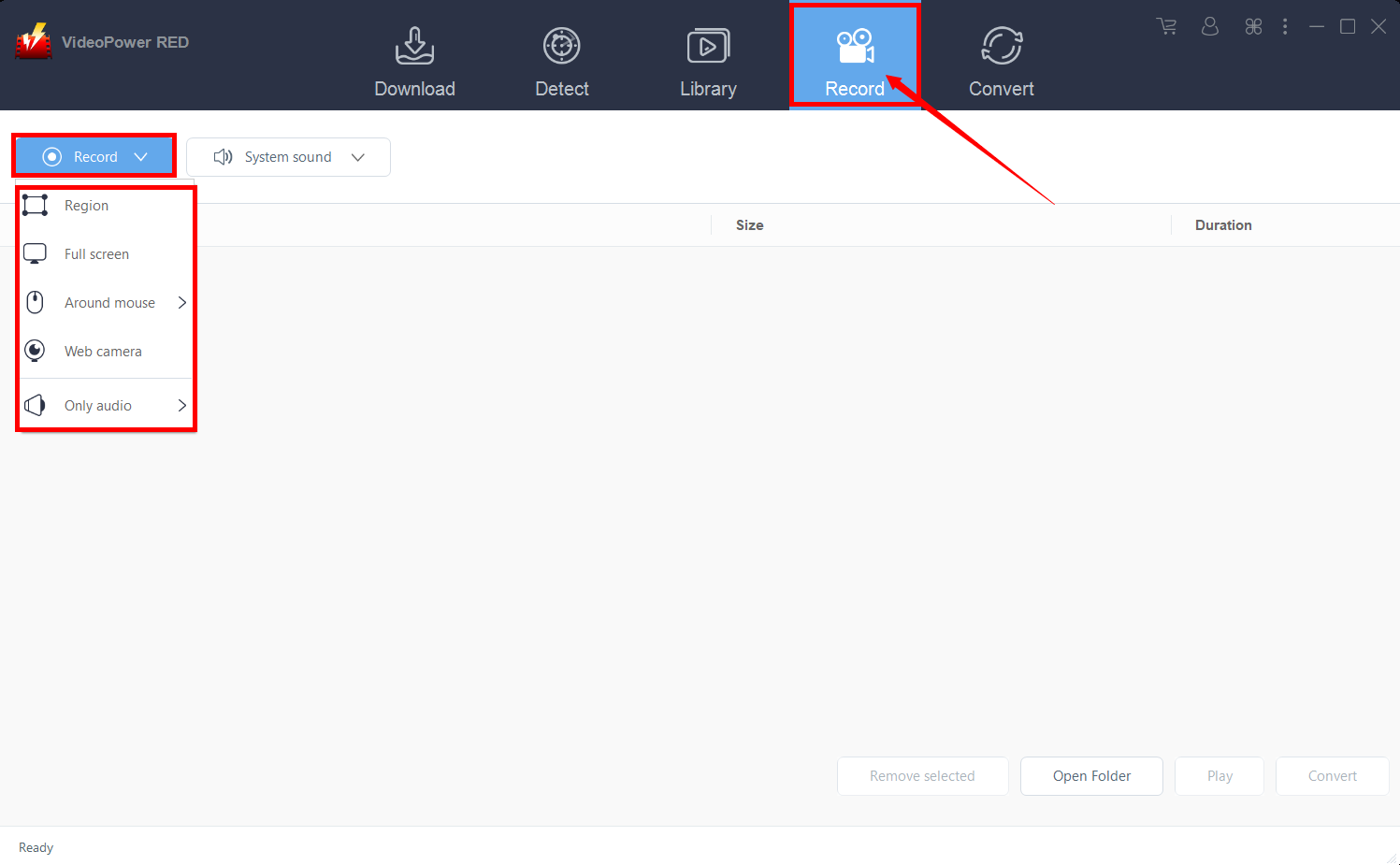
Click the “Record” tab to open the record window and select among the following recording modes such as “Region, Fullscreen, around mouse, and Web camera” to capture the exact and desired range of your screen. Click the preferred one and start recording.
Step 2: Check the recorded video.
After recording, the recorded file can be seen in the interface of the “Record” tab. Right-click to do more operations and double-click to preview.

Method 3: Use External Detector
Step 1: Activate “Enable Advanced Detector”
1) Use the “Enable detector” and start downloading the video file. Detect the videos being played in any sites through an external browser and download it automatically after activating the “Enable Advanced Detector” on the download settings window.

2) Enabling the detector located on the lower left of the software.

Step 2: Check Downloaded File
When the download process has been done, the file will be transferred to the completed downloads list right at the bottom of the downloading list. Right-click to do more operations and double-click to preview.
Notice that the default format is converted automatically to MP4.
Conclusion:
Clipgrab alternative for Windows PC like VideoPower RED is a powerful software that downloads from every website there is with wide selections of video and audio formats to choose to convert from. With its finest conversion feature in which it can convert video and audio formats that suit your device best. It can also record your screen for extra tasks that need to be done accordingly.


