





Tips Index
Yahoo is an American web services provider or an Internet portal that incorporates a search engine and a directory of World Wide Web sites that is organized in a hierarchy of topic categories. As a directory, Yahoo can provide you both new and seasonal content from thousands and millions of sources. Specifically on its shopping, streaming, mailing, and of course news reporting services that help you updated and be connected.
It is also an interesting site not only to broadcast and publish news but also for entertainment concerns. Yahoo music video downloader would be best to download favorite music videos and music video clips online. Moreover, this site is indeed useful but only accessible online. For offline use, Yahoo Video Downloader lets you download Yahoo videos in the easiest possible way.
For you not to think much, an easy way to download your Yahoo videos is to use Yahoo video downloader software called VideoPower RED.
VideoPower RED, known as the amazing, hassle-free, and trusted downloader application software is indeed useful for downloading Yahoo multimedia files. This product also comes with various useful features that can enhance your downloading experience. You can store your desired videos locally with this product in four methods such as copy and paste, with an embedded detector, external detector, and screen recording methods.
Try to use VideoPower RED Yahoo video downloader free version product. Click the link below to download and install the VideoPower RED app.
Method 1: Copy and Paste
Step 1: Copy and paste Yahoo video URL
Go to the Tumblr website and copy the URL of the selected video file that you want to download and then paste it on the product by clicking the “Paste URL” button. After this, the video will be processed in the “Downloading” control panel.
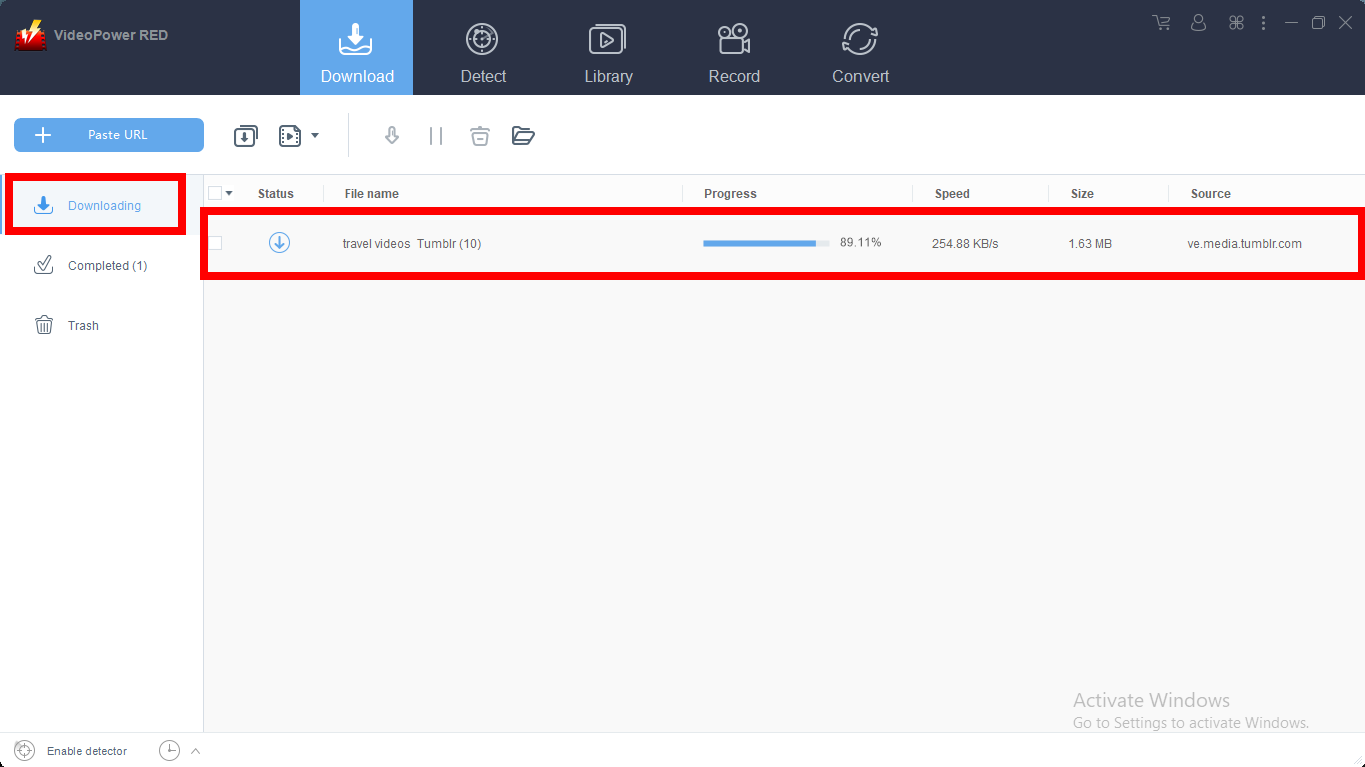
Step 2: Check the downloaded file
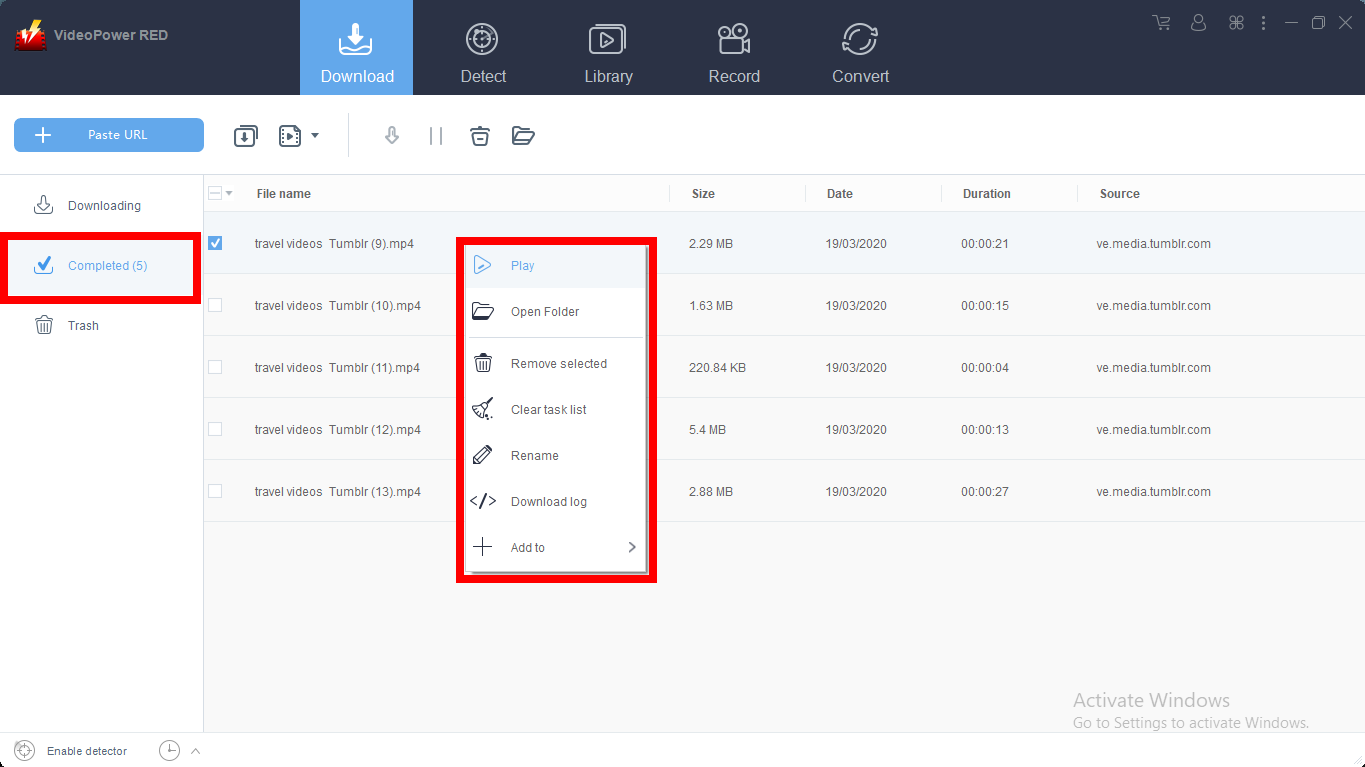
After the downloading process is complete, go to the “Downloaded” section to see and check the downloaded video.
Right-click the selected video to choose from the options on what to do next.
Method 2: Use the Embedded Browser
Download the desired video file using Auto-Detect on the “Detect” control panel. The software can detect the video being played on it and it will be downloaded automatically.
Open the site and play the video file you want to download.
A “Media File Detected” notice will appear to notify that the chosen file has been detected and will be downloaded automatically.

But for YouTube, the video can be downloaded by clicking the download button below the video or copying the link, just like in Method 1.

Wait for the download to finish, and then go to the “Completed” section to find the downloaded video.

Method 3: Use the External detector
Click on the “Settings” button on the upper-right of the interface.

Click on the “Enable advanced detector(Support HTTPS)” under the “Download” tab. Click “Ok” to save the changes made.

Enable the detector located on the lower left of the software.

Play the video
Open the video website and play any video you want to download. The smart tool of this Advanced Detector will automatically download any video you play. A “Media File Detected” pop-up will appear every time the program detects a video.

Wait for the download to finish, and then go to the “Completed” section to find the downloaded video.
Method 4: Record video
Sometimes because of the web update or slow internet connection, the program can’t download the video anymore but you can still save the video by using the recording function.
Step 1: Record video
Click the “Record” tab to record the video and Select from “Region, Fullscreen, around mouse or Web camera” as preferred.

Step 2: Check the recorded video.
After recording, the recorded file can be seen in the record interface.

Conclusion:
Websites that are useful for entertainment, communication and of course news broadcasting are in demand in today’s generation. One of these sites is Yahoo, the web services provider the offers shopping, streaming and mailing services. It is the site where users can also continuously watch their desired and favorite video clips online.
However, users aren’t always connected with the internet. Therefore, users thought to download Yahoo videos with the help of a third-party tool called VideoPower RED.
VideoPower RED is known to be an excellent and easy application software that is best in downloading online videos. This product also has various useful and professional features such as; converting, recording and detecting multimedia files.


