





Tips Index
What is Twitter?
Twitter is known to be one of the most popular microblogging and social networking service sites mostly used by teenagers nowadays. This is a site where users can post and interact with messages known as “tweets”. Users also usually share their daily experiences, emotions, and many more through a post in messages, videos, images, and more. Only registered users can post, like, and retweet tweets, but unregistered users can only read them. The word “Retweet” is the term used when users share other user’s posts as their own.
Repost Twitter Videos
As Twitter doesn’t allow users to share videos from different video sharing sites via URL, users cannot also download videos from twitter alone. Downloading videos from Twitter isn’t possible without the help of third-party and twitter video downloader application software. So, in that case, there is a need for the users to search for a third-party downloader and that would surely be a bit of work for them. However, a reliable downloader that can help users to save video is nowhere. Thus, reposting Twitter videos would be achievable.
Best Twitter Video Downloader
VideoPower RED, an amazing, hassle-free and trusted downloader application software is indeed useful as a Twitter video downloader since this product also comes with various useful features that can enhance your downloading experience. You can store your desired videos locally with this product in four methods such as copy and paste, with an embedded detector, external detector, and screen recording methods. Moreover, with this third-party twitter video downloader, HD video quality is undoubtedly achievable.
Try to use VideoPower RED free twitter video downloader version to have a hands-on experience with the product.
| Functions | Free Version | Activated Version |
|---|---|---|
| Video/Audio Downloader | Only download 1 file at a time. | No Limit |
| Screen/Webcam/Audio Recorder | Only record a 2-minute video range at a time. | No Limit |
| Video/Audio Editor | Convert 30% only of the file. | No Limit |
| Video/Audio Converter | Edit 30% only of the file. | No Limit |
Method 1: Copy and Paste
There are 4 methods to download Twitter videos, follow the step-by-step guide below.
Step 1: Copy and paste video URL from Twitter then download.
Copy the URL of the video from Twitter that you want to download and then paste it on the product by clicking the “Paste URL” button. After pasting the URL, the video will be processed in the “Downloading” control panel.

Step 2: Check the Downloaded Video File.
Navigate to the “Downloaded” control panel to see and check the downloaded video/s. Right-click to do more operations and double-click to preview.

Method 2: Auto-Detect (Embedded Detector)
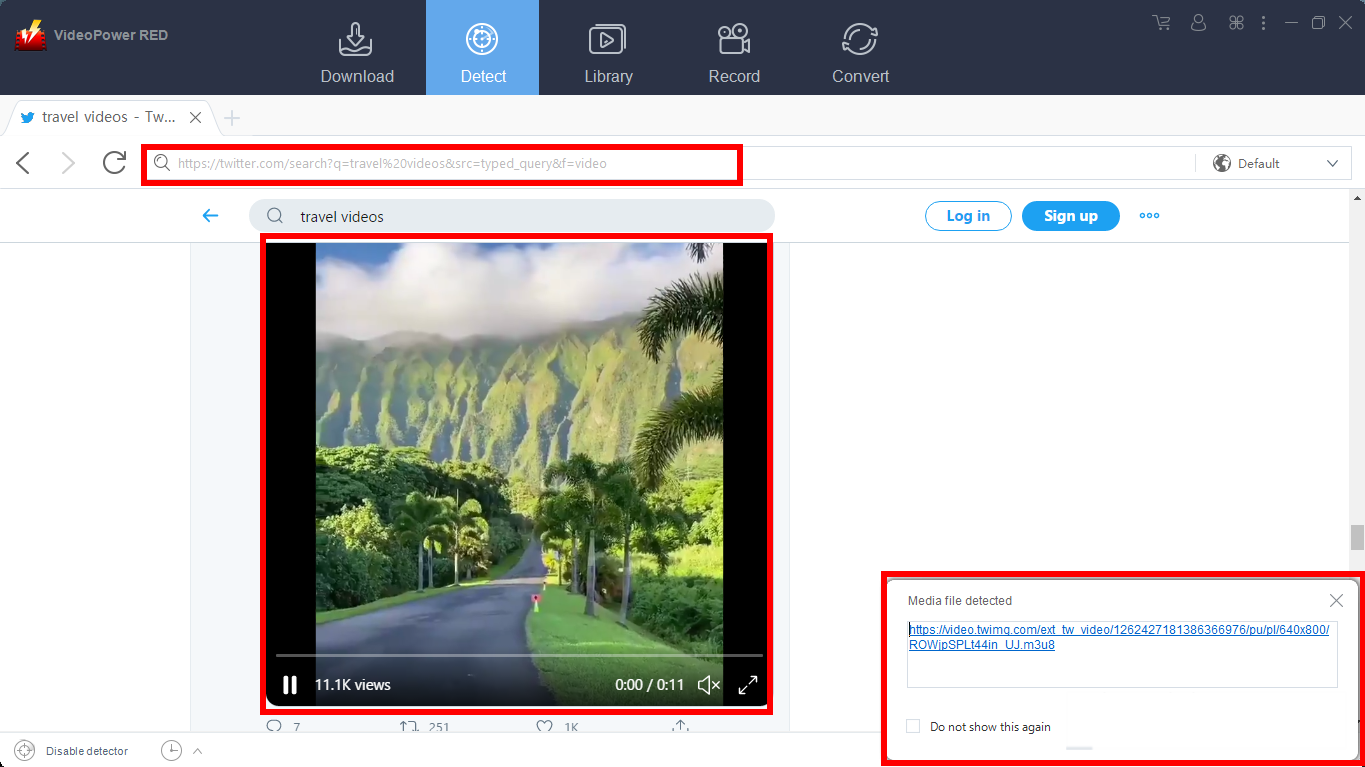
Download the preferred video file from Twitter using the Auto-Detect feature on the “Detect” control panel. The software can detect the video being played on it and will be downloaded automatically from any site except YouTube. There is a “Download” button to be selected first to start the downloading process.
Step 1: Open and download Twitter video through an embedded detector.
1) Log on to Twitter and search for the video you wanted to download.
2) When you play it, a “Media File Detected” notice will appear to notify that the chosen video has been detected and will be downloaded automatically.
Step 2: Check the Downloaded Video File.
Navigate to the “Downloaded” control panel to see and check the downloaded video/s. Right-click to do more operations and double-click to preview.
Method 3: External Detector
Step 1: Activate the “Enable Advanced detector” and start downloading the video file.
Set “Enable Advanced Detector” on the download settings.

Enable the detector located on the lower left of the software.

Now play the video that you want to download. It will be detected and downloaded automatically.
Step 2: Check the Downloaded Video File.
Navigate to the “Downloaded” control panel to see and check the downloaded video/s. Right-click to do more operations and double-click to preview.
Method 4: Screen Record
In some cases, because of slow internet connection and protected sites, downloading would be challenging. Saving private twitter video downloader like VPR is indeed compatible. To continue saving the desired video file/s, use the screen recording feature to make downloading Twitter video/s would be achievable despite its protection.
Step 1: Select the recording mode and start screen recording.
Screen record your preferred video through five different modes such as:
1) Region
2) Full screen
3) Around mouse
4) Web camera
5) Only audio
Choose one from the enumerated modes and the recording will start automatically.

Step 2: Check the Recorded file
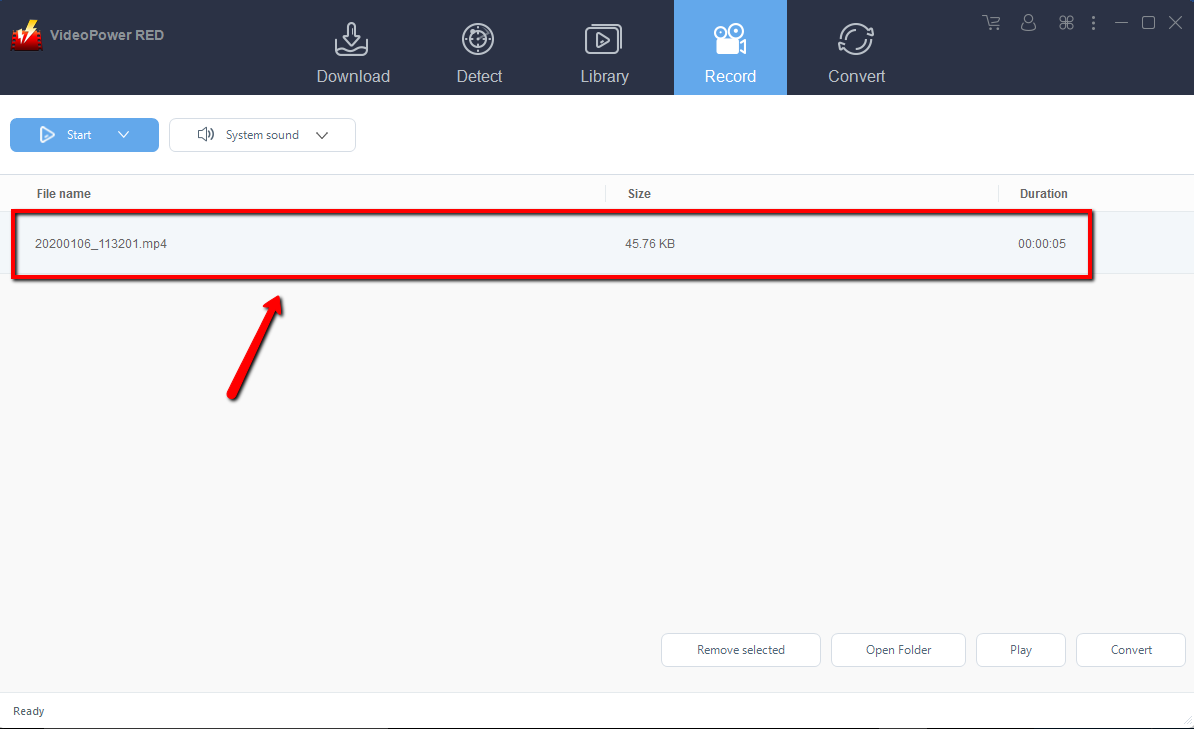
After recording, the recorded file can be seen in the record interface. Right-click to do more operations and double-click to preview.
Conclusion:
There are a number of social networking sites online that allow users to share videos they want and like online and one of those is Twitter. This site is known to be an American microblogging social media site. However, sharing videos on it is a bit challenging. There is a need for the users to download videos first so that they can post it on Twitter and there’s also a need for the users to download Twitter video first before reposting it on other sites like Facebook and Instagram.
Therefore, users thought of searching for a Twitter video downloader app to help them download videos from Twitter. With the help of third-party downloader application software called VideoPower RED, this thought would be achievable.
VideoPower RED is known to be excellent and easy to use application software that is best in downloading online videos. This product also has various useful and professional features such as; converting, recording, and detecting multimedia files that make users run online errands without a hassle.


