





Tips Index
It’s not a secret that YouTube is the world’s most famous video website. Due to the fact that users can easily find millions of music videos, radio music, live shows, movie soundtracks, etc. Youtube is not only a paradise for video fans but also a great site for music lovers. However, compared to streaming YouTube music online it is always better to have the songs downloaded so that it can be played any time offline. Moreover, downloaded video or audio songs will also allow users to transfer their favorite music into any portable device. If you’re also looking for a reliable way to download songs from videos on YouTube, then you are on the right track.
To download songs from YouTube to your computer, all you need is an effective and reliable software specifically a YouTube song downloader app like VideoPower YELLOW. This product is convenient to use with a user-friendly interface, which can download any genre and format multimedia files. Copy the URL and extract the song from the youtube video and enjoy it offline.
VideoPower YELLOW is an audio downloader and recorder that can also extract YouTube videos to an audio format which is better for compatibility issues for your devices especially mobiles. If you want to save songs from YouTube, this software can indeed do that very well.
To know this app better, try to use its free trial version on your pc. Just click the DOWNLOAD button below.
Step 1: Copy URL from the selected site
Open the site you prefer and select the video file you want to download and save locally. Copy the exact URL of that video file from the search bar.

Step 2: Paste URL to VideoPower YELLOW
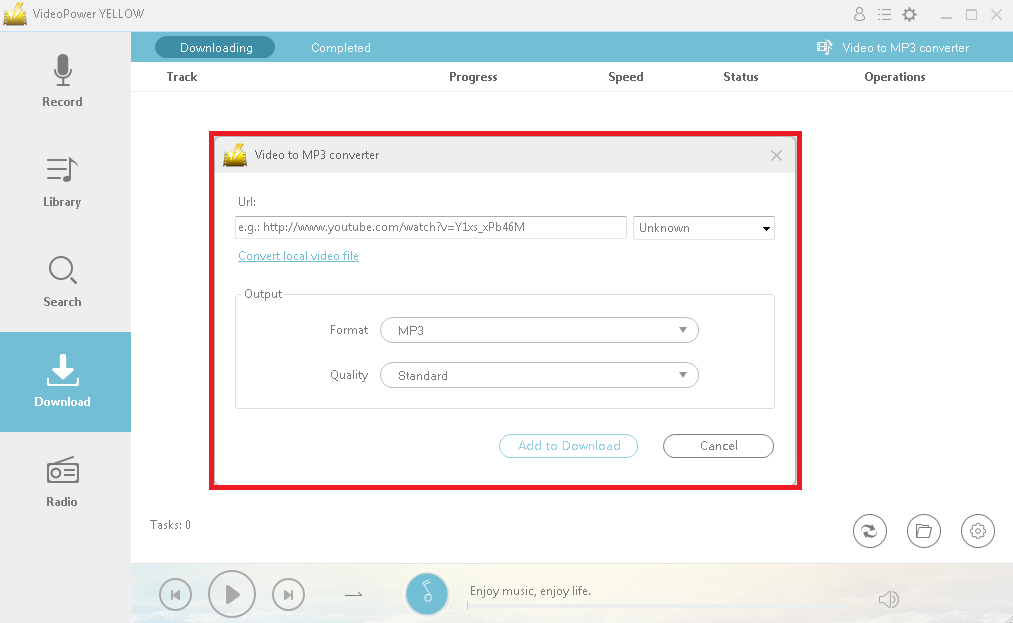
After clicking the “Video to MP3 Converter”, a new window will pop-up. Paste the URL you copied from the site on the URL bar on the pop-up window. Set the output format based on your preference and click the “Add to Download” button to start extracting the video and downloading the song as an audio file.
Step 3: Process Download
After that, you will be automatically redirected to the downloading window in the download bar. Wait for it to finish.

Step 4: Download Complete
When the download is finished, click the “Completed” button above to show the downloaded file. Right-click to do more operations and double-click to listen.

Conclusion:
It is quite simple to use with a user-friendly interface of an amicable product with a very clean and fast conversion and download speed. VideoPower YELLOW supports nearly all types of video and audio files to be downloaded converted in any file format. It also contains a number of songs and music from the internet that you may like to download. To try how well this app work, download and install it’s free trial version now and purchase it to experience its full features.


