





Tips Index
Ringtones on mobile phones is a short audio file played to designate an incoming call. A modern ringtone might be composed of a number of bars of a familiar musical sound. Such ringtones are famous because, in a mass of people with numbers of cellular phone sets, they can easily determine whose phone is calling out for attention. The growth of cellular telephones in the past few years has given leap up to a wide variety of ringtones.
So why make Chimes or Marimba your ringtone if you can choose from YouTube a ringtone to serve as a symbol of your individuality? Selective iPhone owners want a ringtone that fits the quality of their good taste that stands out of the crowd, but is it possible to convert YouTube videos and music to ringtones? The answer is yes. With the help of the right tool, you can now download and convert YouTube videos to ringtones fast and easy.
Transforming youTube music to iPhone ringtone? Here, introducing VideoPower RED, a powerful, reliable and easy to use video downloader that can also convert YouTube into audio files. It can also download videos from different video sharing sites like YouTube, Twitch, Facebook, Twitter, Dailymotion, TED, Vevo, Vimeo, Instagram and many more.
Just click the link below to download this app and follow through the guide below on How to Download YouTube to iPhone Ringtone.
Part 1: Download Audio File
When you download an audio or video from any website with VideoPower RED application software, you’ll be given 4 methods on how to do it easily. It is through, “Copy and Paste”, “Embedded Detector”, “External Detector” and “Screen Record” methods. In downloading audios from YouTube for an iPhone ringtone, “Copy and Paste”, “Embedded Detector”, and “External Detector” are the recommended methods. Copy and Paste is the most recommended method. read and follow the steps below.
Step 1: Set AAC Audio Format
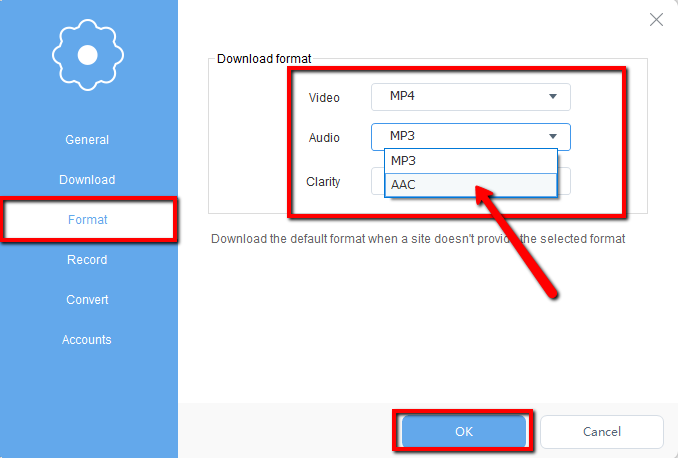
Click the “Settings” button from the drop-down menu on the upper-right corner of the product interface. Select the “Format” tab and click the “Audio” search bar to change audio format to “AAC”. Click “OK” to save format settings.
Step 2: Set Downloading Type
Change the downloading format to audio. Select the second button behind the “Paste URL” button and click the second option from the small drop-down window to download only the audio of the YouTube file.

Step 3: Copy YouTube Video File URL
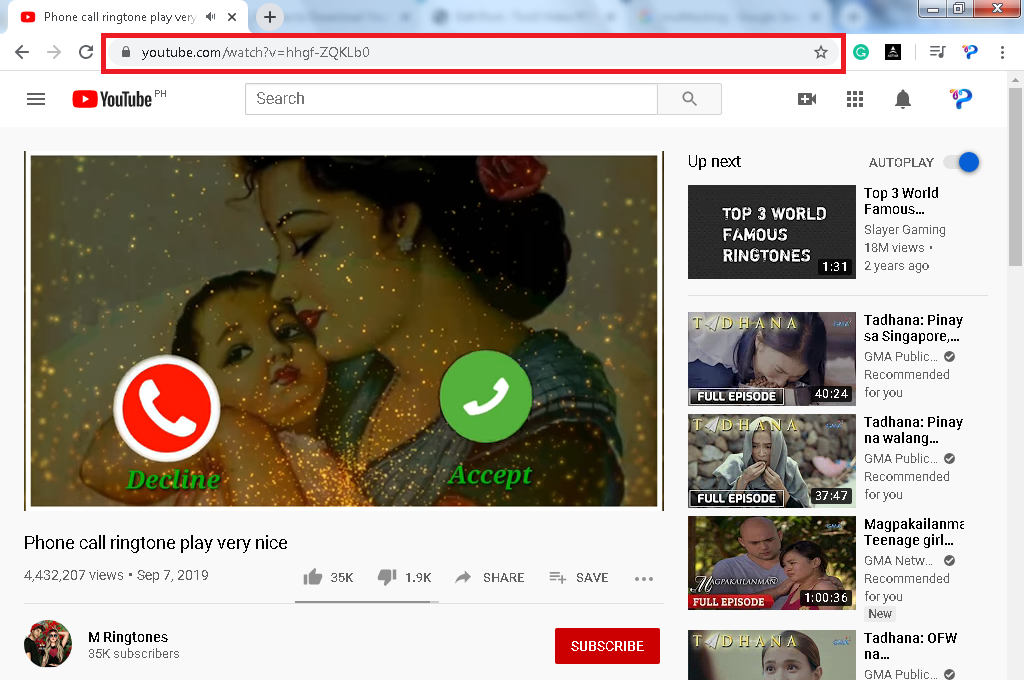
Open the YouTube site and search for your preferred music or sound for your iPhone ringtone. Copy the URL.
Step 4: Paste YouTube Video File URL and Download
1) Copy the link of the YouTube video that you want to download and then paste it into the program by clicking the “+ Paste URL” button. After that, you will see the video is downloading in the download control panel.

2) Wait for the download to finish, and then go to the “Completed” section to find the downloaded audio. Right-click if you want to do more operations and double-click to preview.

Part 2: Add the Downloaded File to iTunes
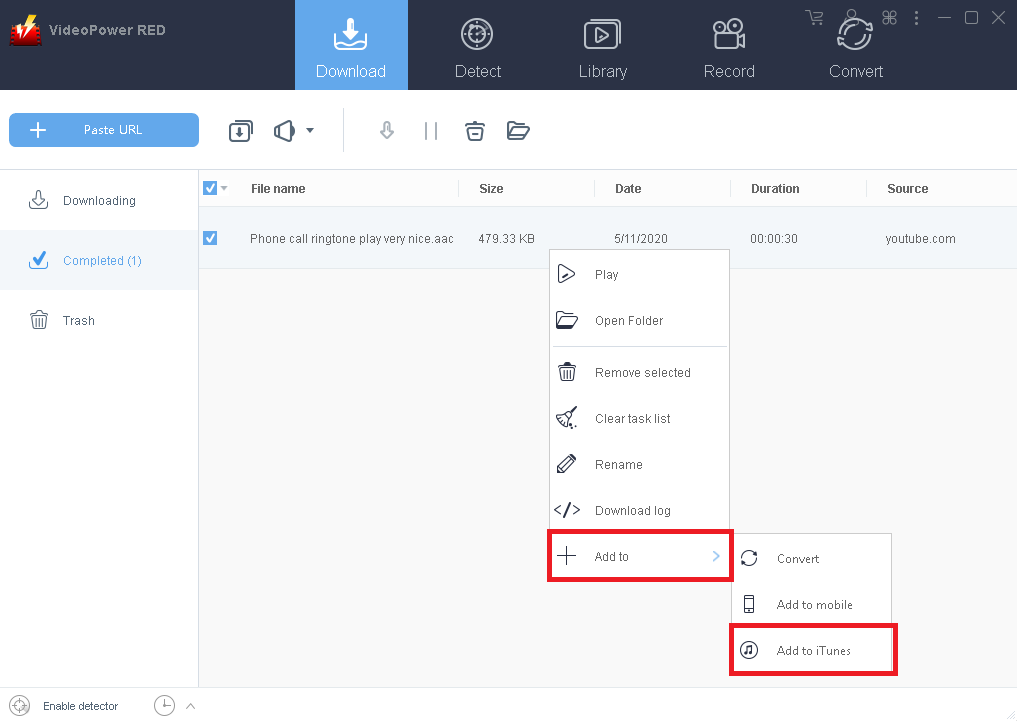
After the download is finish. Right-click the downloaded file and point the mouse pointer on the “+ Add to” button and click “Add to iTunes”.
Conclusion:
Introducing one of the fastest reliable and versatile video downloader software called VideoPower RED. The best in video downloading performance with high-quality resolution results. It can also download YouTube to audios for iPhone ringtone purposes. Not just downloading, the app is very versatile that it can also record and convert files into different kinds of formats like MP4, MKV, AVI, WMV, and ETC. Isn’t it amazing to have VideoPower RED? Now, downloading videos is just a piece of cake. So what are you waiting for? Download now.


