

Tips Index

Nowadays, video has become a very important part of people’s life.
Most of the time, users use videos for:
Educational purposes.
conference report.
Leisure and entertainment.

YouTube is one of the world’s largest online video sites, providing a large number of free video resources. On YouTube, you can always find the video resources you want.

Many users sometimes found YouTube videos interesting and useful for some later and offline purposes. Thus, users ought to download and save them to their computers or iPad.

To use VideoPower RED, just click the link below and download the program.

You can try to use the software for free by downloading its trial version below.

FREE DOWNLOAD

Windows 7 / 8 / 8.1 / 10 supported

Step 1: Paste the Youtube URL and download video

Copy the link of the video that you want to download and then paste it into the program by clicking the “Paste URL” button. After that, you will see the video is downloading in the download control panel.

download 4K videos, VideoPower RED, paste and download

Step 2: Check downloading and downloaded file

Wait for the download to finish, and then go to the “Completed” section to find the downloaded video.

download 4K videos, VideoPower RED, complete download

Step 3: Convert Youtube to iPad

Right-click the downloaded file, click “Add to” and navigate to “Convert”. You will now be redirected to the Convert interface.
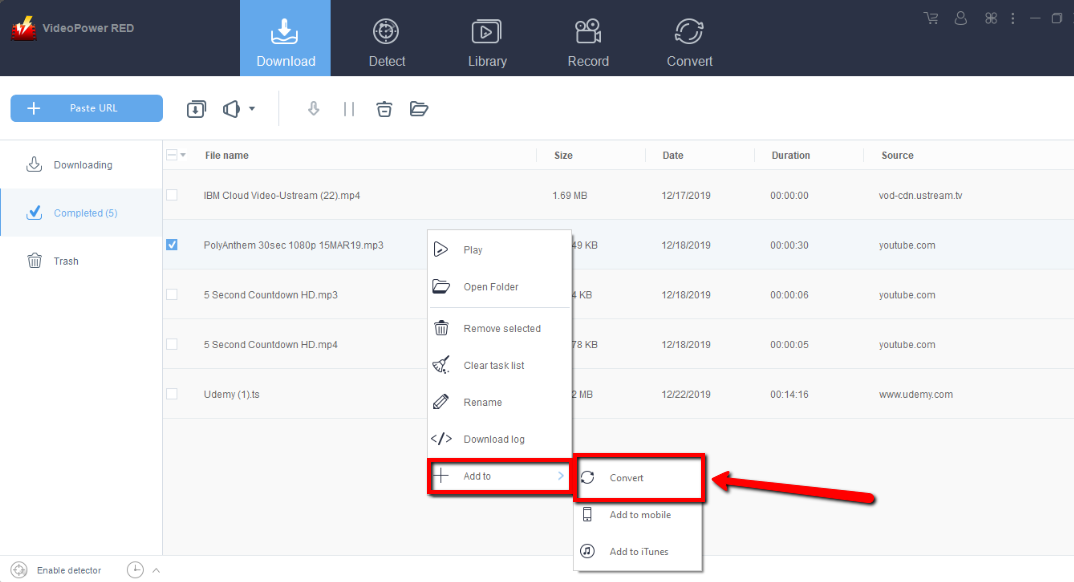
Amazing Youtube to iPad converter, VideoPower RED, convert video

Click “Profile”, and navigate to “Device”, Choose from the “Apple” format, scroll down to see iPad format and choose as preferred.
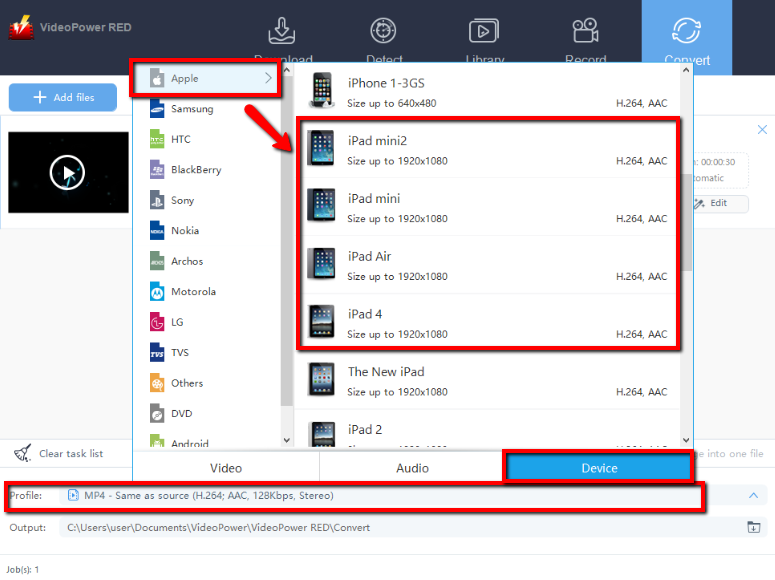
Amazing Youtube to iPad converter, VideoPower RED, choose format

Hit the “Convert” Button to start Conversion.
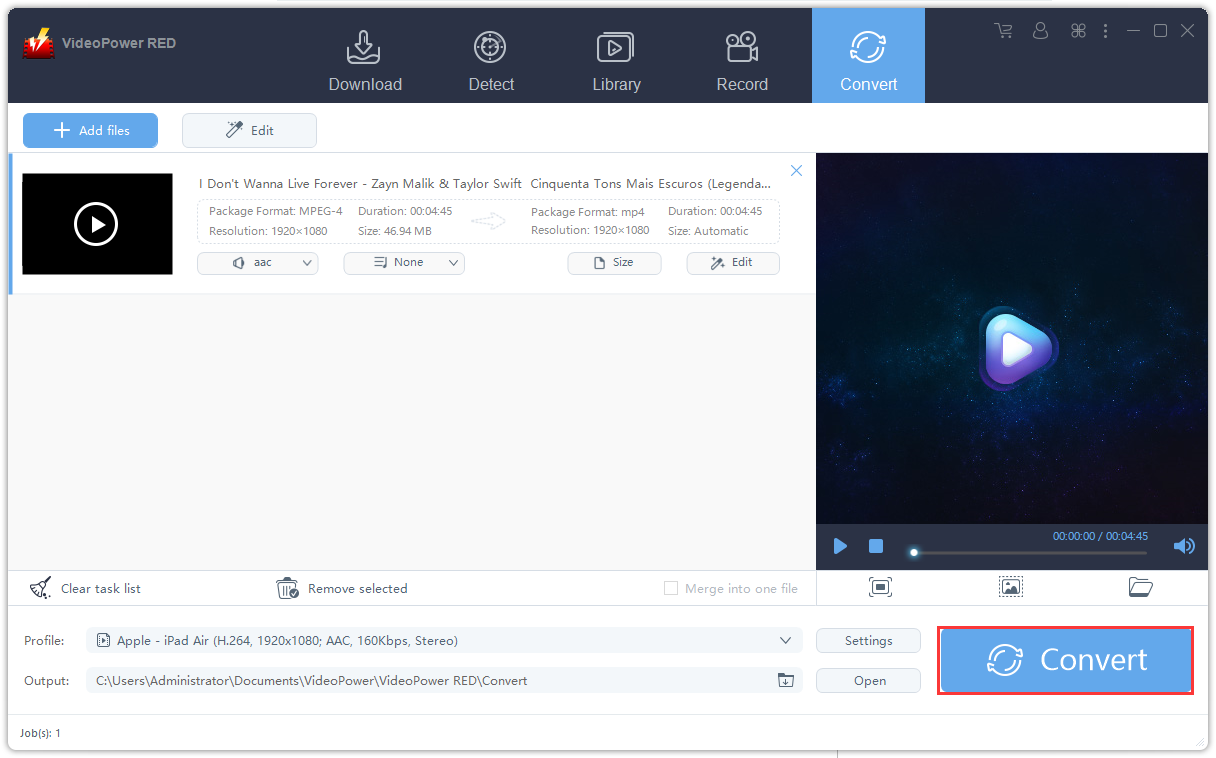
Amazing Youtube to iPad converter, VideoPower RED, start conversion

This will appear after the conversion is over. Click “OK” to check the file.

Amazing Youtube to iPad converter, VideoPower RED, saved file

Conclusion:

Many users sometimes found YouTube videos interesting and useful for some later and offline purposes. Thus, users ought to download and save them to their computer or iPad. Therefore, VideoPower RED, an amazing, hassle-free downloader application software with various professional features is best suited for this kind of matter.

Related Posts

Video Download
Record
Convert

VIDEO POWER

RED

  • Download video and audio from over 1000 video site
  • Batch download YouTube playlist
  • Record screen and audio with real-time annotation
  • Trim, crop, rotate video with a strong video editor
  • Windows 7, 8, 8.1, 10 (32/64bits)
> DOWNLOAD <
LEARN MORE

Schedule Recording
Annotation
Video Edit | Convert

VIDEO POWER

GREEN

  • Record screen and audio with real-time annotation
  • Create a scheduled task to record screen and webcam
  • Enrich your recorded video by powerful Video Editor
  • Capture and annotate your screen in the picture
  • Windows 7, 8, 8.1, 10 (32/64bits)
> DOWNLOAD <
LEARN MORE

Video Convert
Record
Slideshow Maker

VIDEO POWER

BLUE

  • Convert video and audio to various formats at super fast speed without quality loss
  • Make your own video clips or movies with fantastic themes
  • Transform multiple videos and photos in one frame as a collage
  • Trim, crop, rotate, effect, watermark, subtitle, etc. in video editing
  • Windows 7, 8, 8.1, 10 (32/64bits)
> DOWNLOAD <
LEARN MORE

Music Search
Download
Record

VIDEO POWER

YELLOW

  • Records music and audio from various sources in lossless

  • Search and download music

  • Auto-add music ID3 tags for recorded music

  • ID3 Tag Identifier and Editor, Audio Editor/Converter, CD Ripper/Burner, Transfer to iTunes, etc

  • Windows 7, 8, 8.1, 10 (32/64bits)

> DOWNLOAD <
LEARN MORE

Whatever fits your needs, it's here.
Which one would you choose?

> Video Power Series Comparison <