





Tips Index
The term FPS means “Frames Per Second” and is used to measure the quality of a video. This measurement is mostly used in video games to measure the smoothness of the game’s visuals. FPS means this is the number of images that a particular video can generate in a second. 60 FPS has a higher quality or has a smoother appearance than, say, 30 FPS because it can generate twice as much number of full-screen images.
Basically, the concept of “moving pictures” is put into practice but on a grander scale. Because there are multiple frames in a second, this creates a smooth flow of movement that you would not be able to see in a lower setting.
YouTube is one of the largest video sharing websites online and most recently, they announced that their videos will now have the option of 60 FPS. This modification is done on the website’s server though, so there won’t be any problems with needing to update mobile apps. This is a great opportunity for people that want to download their favorite YouTube videos in high quality.
To download YouTube videos in MP4, you’re going to need a third-party program like VideoPower RED. This software has various functions and features that can help you with your tasks but its main function is to download videos. You can use VideoPower RED to download 60 FPS YouTube videos.
To install the software, just click the link below to download the installer.
Method 1: Copy and Paste URL
Step 1: Paste URL and download video
Launch VideoPower RED to download 4K Ultra HD videos from YouTube.
1.1 Open the video analyzer
The first thing you see in the interface is the Download tab. To ensure a 60 FPS YouTube video download, click to open the video analyzer where you can choose a resolution for your video download.

1.2 Paste the video URL
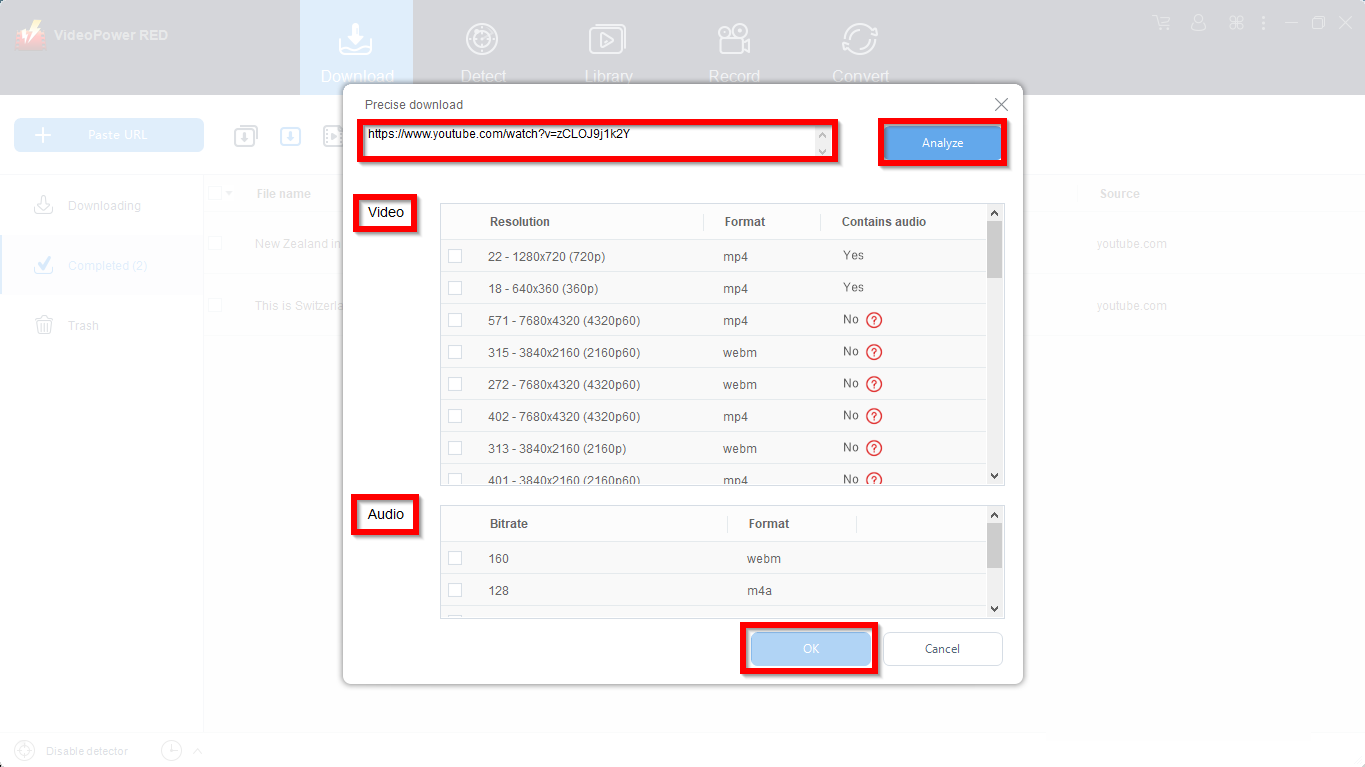
Copy the link of the YouTube video that you want to download and then paste it into the box under the “Precise download”. After that, click “Analyze to start analyzing precise resolution for the video quality.
Video
To ensure a 60 FPS video download, choose any video quality that ends with p60. Like 2160p60, it means a 4K video in 60 FPS.
Audio
To include audio in your video to be downloaded, select a compatible audio format. If you choose WebM video format, the audio chosen audio should be in WebM format as well. If the video format is MP4, then audio should be in M4A format.
Click “OK” to start the download process.
Step 2: Downloading Process
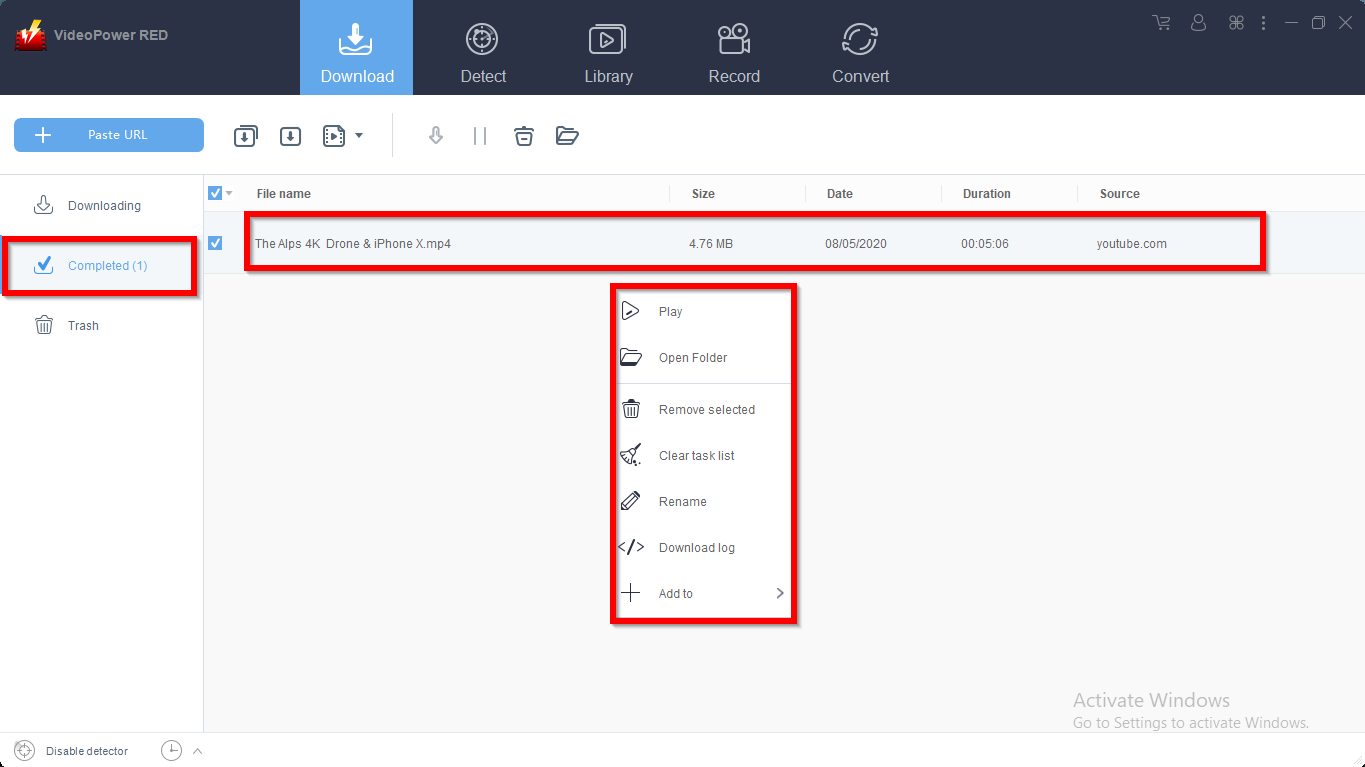
After that, you will see the video is downloading in the download control panel.

Wait for the download to finish, and then go to the “Completed” section to find the downloaded video. Right-click on the file to do more actions like playback or to location folder.
Conclusion:
Because of the new feature of YouTube, you can now watch videos online in high quality using 60 FPS. Nevertheless, if you have a troublesome internet connection, you may not be able to watch 60 FPS YouTube videos so downloading them with VideoPower RED is the next best thing.
VideoPower RED is packed not just as a downloader but as a converter and video editor as well. It could convert all video and audio files into common formats and devices easily. It’s handy and reliable that you can even convert in batches simultaneously while preserving good quality.
It has a built-in video editor that will enable you to edit slideshows or videos, apply watermarks, effects, and other basic video editing options such as trimming or cropping. Moreover, it has a split-screen tool for your photos and videos and a screen recorder which allows you to capture any on-screen activity on your computer. There’re so many advanced functions equipped in this program, which offer more options for you to convert and edit media files.


