





Tips Index
The market before was deluge with HDTVs, and 4K Ultra HD TVs don’t have that many products in stores for people that don’t have budgets for buying one. But today that’s no longer the case. In fact, if you’re seeking a new television with a 40-inches screen or larger, you’ll have to give an effort to find one that doesn’t support 4K. But what is 4K UHD? Do you really need one?
4K Ultra HD is the name of a screen with a resolution of four times the 1080p HD TV has. That is 8 million pixels being filled into the same space in which a Full HD TV conform just two million, achieved by making each pixel four times lesser. The result is a more clear image, colorful, and HDR.
And with each pixel smaller, each one is shared in a bigger picture, other extra pixels carry a bigger jolt on a large screen because you can fit more of them in. Fundamentally, you’ll need to strain to find a 4K TV with a smaller screen than 40 inches.
So now you bought one of the Ultra HD 4K TVs, so you’ll probably need to download 4K contents to watch. The largest collections of 4K video content available can be found on YouTube, but YouTube does not offer a download feature.
On these terms, you will need a YouTube video downloader such as the VideoPower RED. This app allows you to download a full or 4k sample video with 60fps speed and with the highest quality results. It can also download videos in different video sharing sites such as Facebook, Twitter, Vimeo, Vevo, Twitch and many more.
Download unlimited 4k content on YouTube using this software.
Just click the link below to download this free app and follow through the guide on How to Download 4k contents on YouTube.
Step 1: Paste URL and download video
Launch VideoPower RED to download 4K Ultra HD videos from YouTube.
1.1 Open the video analyzer
The first thing you see in the interface is the Download tab. To ensure a 4K video download, click to open the video analyzer where you can choose a resolution for your video download.

1.2 Paste the video URL
Copy the link of the YouTube video that you want to download and then paste it into the box under the “Precise download”. After that, click “Analyze” to start analyzing precise resolution for the video quality.
Video: To download 4K Ultra HD quality videos, choose 2160p resolution. For videos that do not contain audio, you can choose audio from the audio list, so your 4K video can have audio too. You can choose to download MP4 or WebM format according to your need, here choose MP4 format for example.
Audio: To include audio in your 4K Ultra HD video, select M4A format that is compatible with MP4. If choose WebM video format, audio should choose WebM format as well.
Click “OK” to start the download process.

Step 2: Downloading Process
After that, you will see the video is downloading in the download control panel.

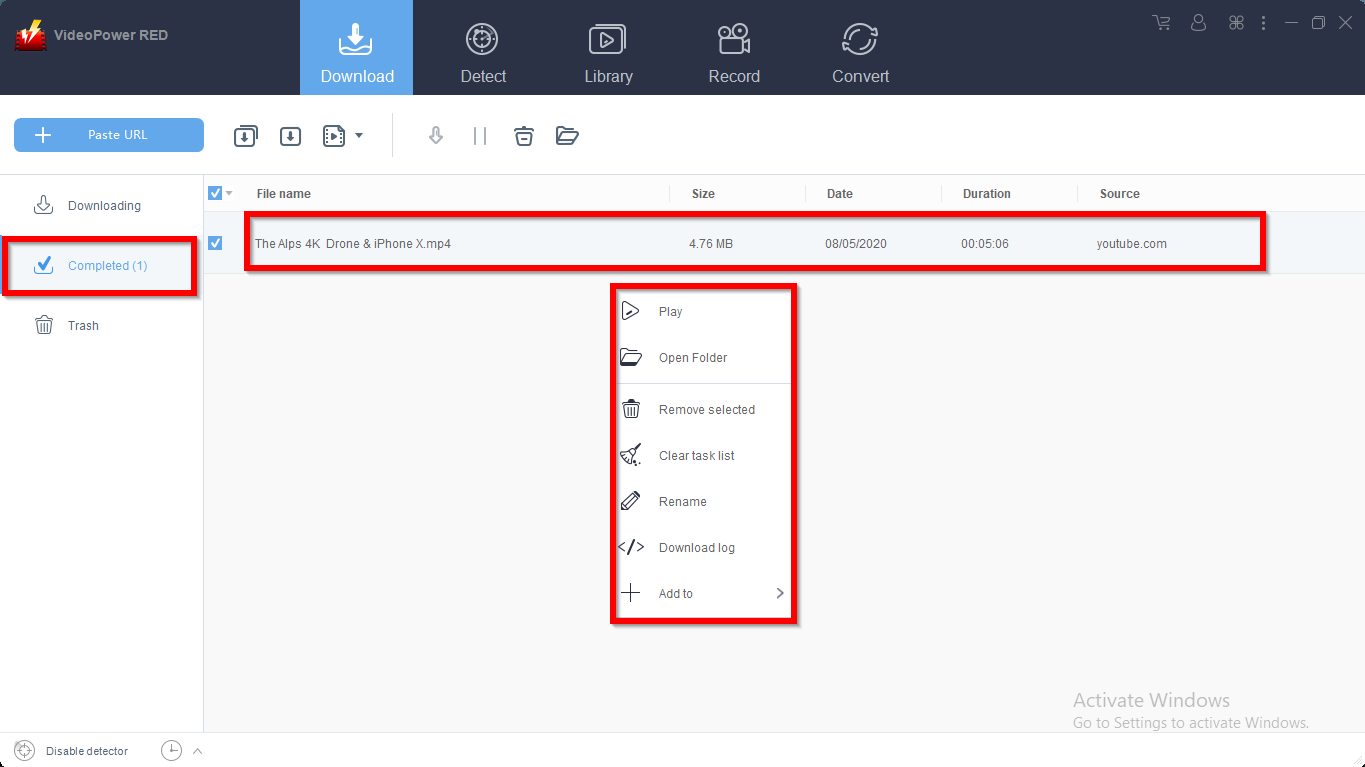
Wait for the download to finish, and then go to the “Completed” section to find the downloaded video. Right-click on the file to do more actions like playback or to location folder.
Conclusion:
VideoPower RED is dynamic and astonishing with a faster-downloading speed that can download thousands of videos in just one click. It has the ability to download videos in High Definition such as 4K contents from YouTube. The app can also record videos using your web camera and convert files into different kinds of formats. Now your problems are solved. Download now the free video downloader and enjoy watching videos in 4K.


