





Tips Index
The American animated television series SpongeBob SquarePants season 1-12 was created by the late marine biologist/animator Stephen Hillenburg, first aired from May 1, 1999, to April 8, 2000, on Nickelodeon, consisting of 20 episodes.
SpongeBob SquarePants is one of the most well-known shows of Nickelodeon. The series annals the achievement and adventures of SpongeBob SquarePants and his funny energetic friends in the fictional underwater called the city of Bikini Bottom. In the middle of the first guest stars to come into sight on the show were Tim Conway and Ernest Borgnine dubbing the superhero characters of Barnacle Boy and Mermaid Man.
Many kids are addicted to watching SpongeBob SquarePants episodes for its entertainment. There are tons of video sharing sites online that would let you watch full Spongebob episodes including YouTube.
YouTube has several full episodes that you can choose from and aside from watching SpongeBob Squarepants, it also has other anime shows and cartoons to choose from. With literally hundreds of SpongeBob episodes, it will be hard to catch up, but there is always a way to download SpongeBob SquarePants episodes.
This way, people can watch it anytime and anywhere at their convenience. The way to get SpongeBob SquarePants episodes is by using a video downloader called VideoPower RED. A very reliable and fast video downloader with satisfying quality results. It can also download videos from different video sharing sites such as Facebook, Twitter, Instagram, Vevo, and ETC.
Just click the link below to download its free trial and follow through the steps on How to Download SpongeBob Episodes. You can try to use the software for free by downloading its trial version below.
Method 1: Copy and Paste Url To Download SpongeBob videos
Step 1: Copy and Paste URL and download video.
Copy the link of the SpongeBob video that you want to download and then paste it into the program by clicking the “Paste URL” button. After that, you will see the video is downloading in the download control panel.
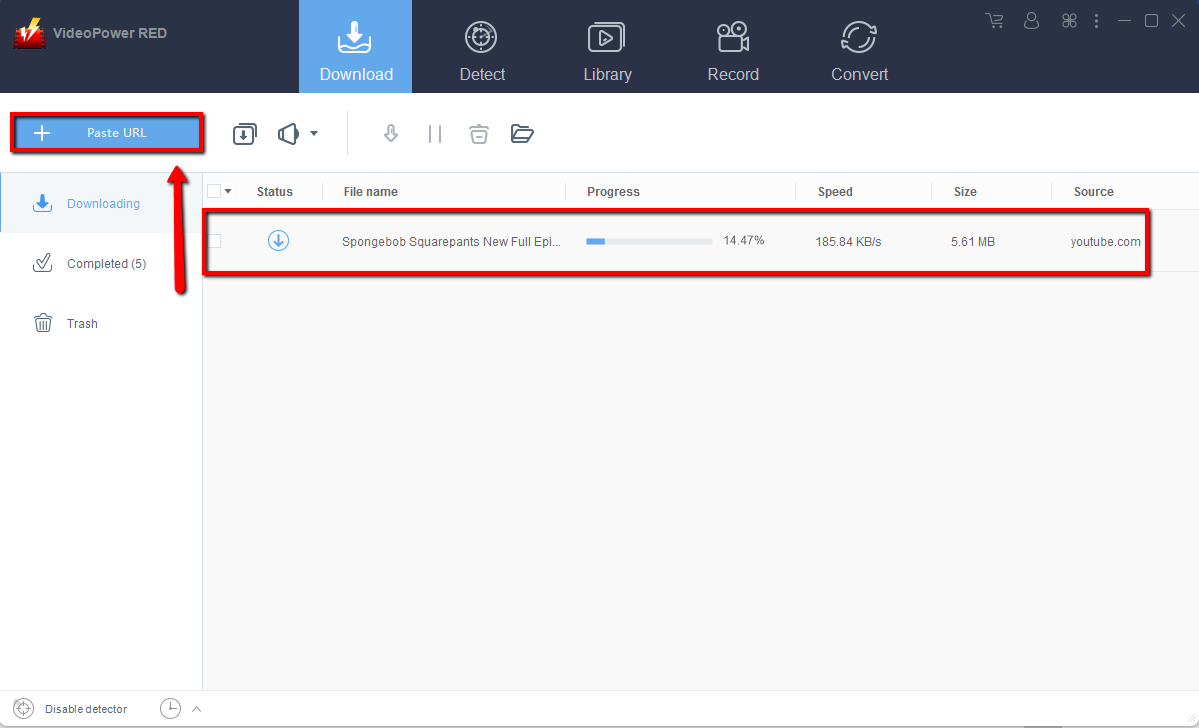
Step 2: Check the downloaded SpongeBob video File
Wait for the download to finish, and then go to the “Completed” section to find the downloaded video. Right-click to do more operations and double-click to preview.

Method 2: Use the Embedded Browser to Download SpongeBob Videos
Step 1: Open the video page via an embedded browser
If the program supports the site like YouTube, SpongeBob video will be downloaded by clicking the download button below the video.

Step 2: Check the downloaded SpongeBob video File
Wait for the download to finish, and then go to the “Completed” section to find the downloaded video. Right-click to do more operations and double-click to preview.

Method 3: Screen Record video.
Sometimes because of the web update or slow internet connection, the program can’t download SpongeBob video or any kind of video but you can still save the SpongeBob video by using the recording function.
Step 1: Set Recording Methods
Click the “Record” tab to open the record window and select among the following recording modes such as “Region, Fullscreen, around mouse, and Web camera” to capture the exact and desired range of your screen. Click the preferred one and start recording.

Step 2: Check the recorded video
After recording, the recorded file can be seen in the record interface. Right-click to do more operations and double-click to preview.

Conclusion:
Getting Episodes from Spongebob Squarepants has never been difficult with the use of this downloading software. VideoPower RED is highly recommended because of its smooth process and easy to use interface. Watching your favorite videos and movies without the internet wherever you are is now possible. It also comes with a video and audio converter with an array of formats to choose from. Download now!


