Tips Index
The MTS format is an emerging high definition video format. Sony, JVC, and the video shot by Panasonic’s HD hard disk camera are often in this format.
It is neither easy to play in other devices nor to edit and save so it makes your PC slow down or even freeze. It will be much more convenient to convert MTS format into AVI as it features audio and video high synchronization while preserving good quality.
Here we recommend that you use VideoPower BLUE to convert the MTS format, which is a safe and free video converter. It supports format conversion like MTS to AVI, MTS to MP4 and so on.
You can try to use the software for free by downloading its trial version below.
Step 1: Add MTS file to convert to other formats
Run the program if you have installed the Video Converter successfully on your PC. You can directly import the MTS file to the program by clicking the “Add files” button or via drag-and-drop to the interface.

Step 2: Edit MTS file before conversion
If you need to edit the video file before converting it to AVI format, click the “Edit” button on the right side of the file.

The built-in video editor will pop up. You can adjust the speed and volume, trim, rotate or flip videos, add effects, subtitles, watermark, and many more that will make editing conveniently easier.
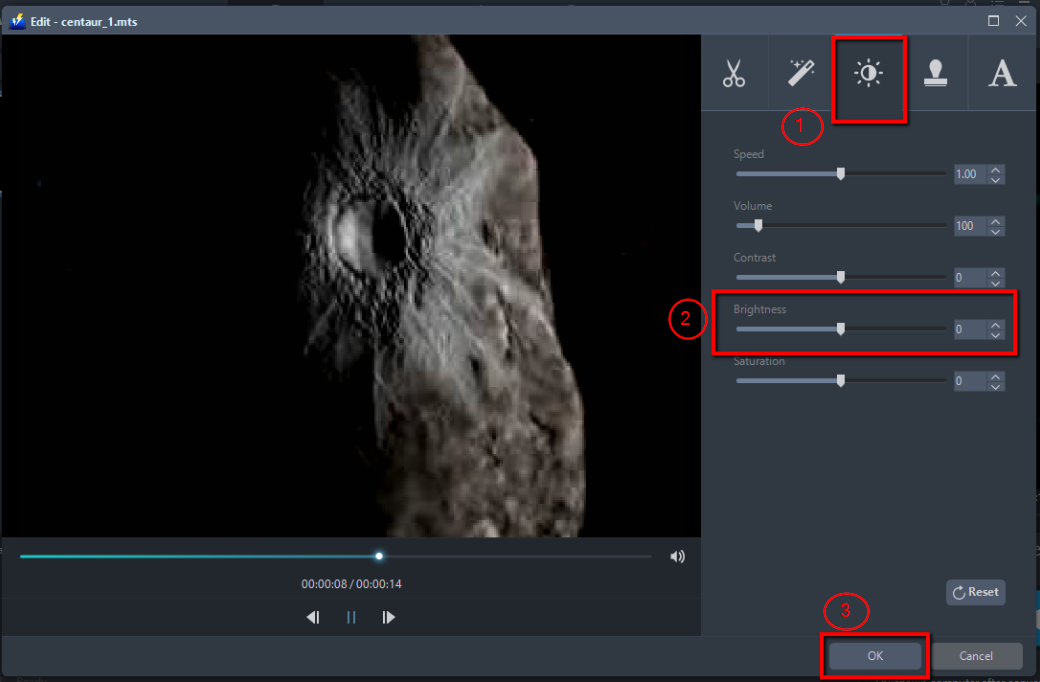
For example, you can adjust the brightness of your video as shown below:
1) Click the “Effect” tab.
2) Find “Brightness” and drag left/right to change the lightness or darkness of your video.
3) Click “OK” to save the settings.
Step 3: Convert MTS to AVI format
3.1 Choose output format
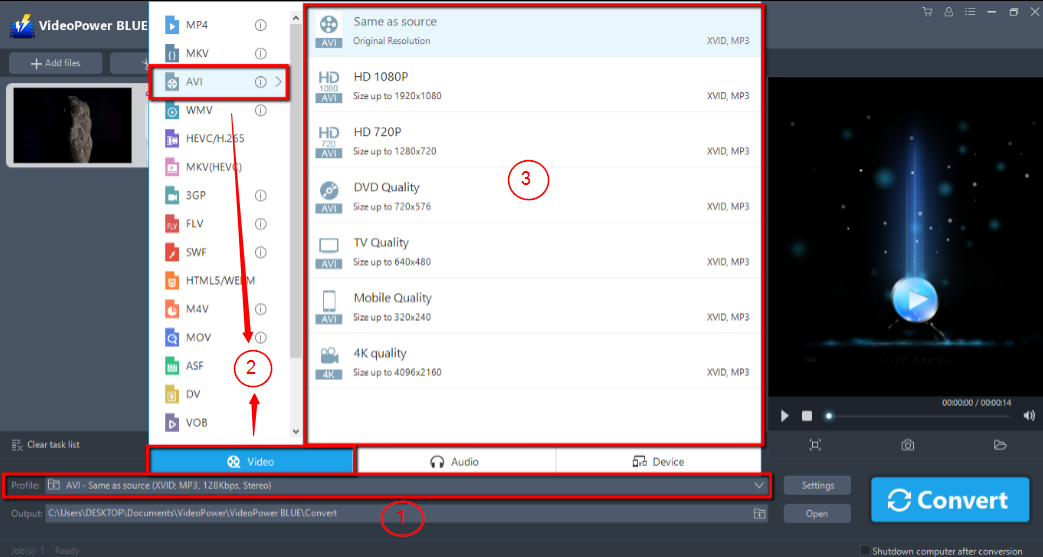
1) Click to open the “Profile” drop-down menu, then choose the format you want from the profile list.
2) Here you can click “Video” and then “AVI”.
3) You may now choose the quality you prefer.
3.2 Start Conversion
Return to the file list.
Click the “Convert” button, then the converted WMA file will be saved in the default output folder.

3.3 Find the Converted file
A pop-up window from the program will appear informing you that the conversion is complete. Click “OK” to open the folder of your saved converted MP4 files.

Conclusion:
AVI is a great alternative to the MTS file. VideoPower BLUE software can convert all video and audio files into common formats and devices easily. It’s handy and reliable that you can even convert in batches simultaneously.
It has a built-in video editor that will enable you to edit slideshows or videos, apply watermarks, effects, and other basic video editing options such as trimming or cropping. Moreover, it has a split-screen tool for your photos and videos and a screen recorder which allows you to capture any on-screen activity on your computer. There’re so many advanced functions equipped in this program, which offer more options for you to convert and edit media files.