





Tips Index
Modern communication methods are becoming more and more diversified and advanced through the use of telephone calls, online chat, video chat and so on.
Most of the communication devices like mobile phones, laptops, and computers supported video chats as well as online sites like Facebook, Instagram, Skype, WeChat and many more. As it is a very intuitive way of communicating with others.
Thus, for people that are far away from their loved ones, whether they’re working abroad or in a long-distance relationship, saving their call and chat as a video for later viewing or as a remembrance.
Unfortunately, the chatting sites you are using normally don’t provide recording tools.
In that case, VideoPower GREEN a powerful and remarkable Video Chat Recorder is recommended for you to save your recorded video chat.
Step 1: Set up settings before recording your video chat
Choose a sound source.
You can choose “System sound, Microphone, System sound and microphone or None.” To record video chat, you can select “System sound and microphone”.

Select a recording area.
Click on the “Record” button to choose the recording mode from “Full screen, Region, Audio, Web camera, Around mouse”. Select the area you are going to record.

Step 2: Start to record your video chat
The pop-up window will ask whether you are ready to start recording, click “OK” to confirm when you are ready to record.

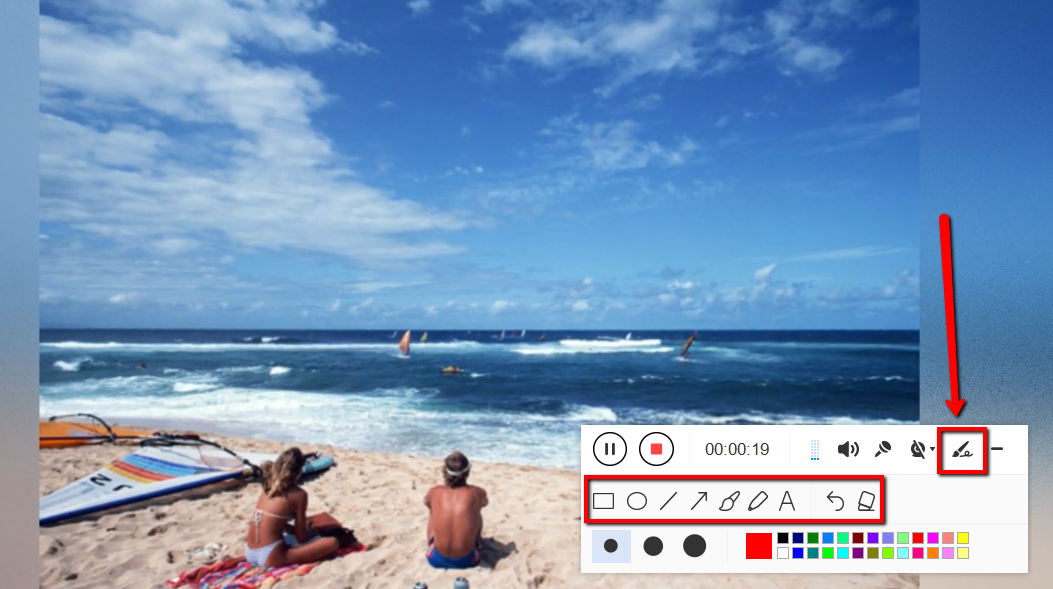
Edit video while recording:
While recording you can add lines, arrows, shapes, texts, highlight, blur, etc. by clicking the edit button.
Step 3: End video chat recording
Click the “Stop” button to stop recording.

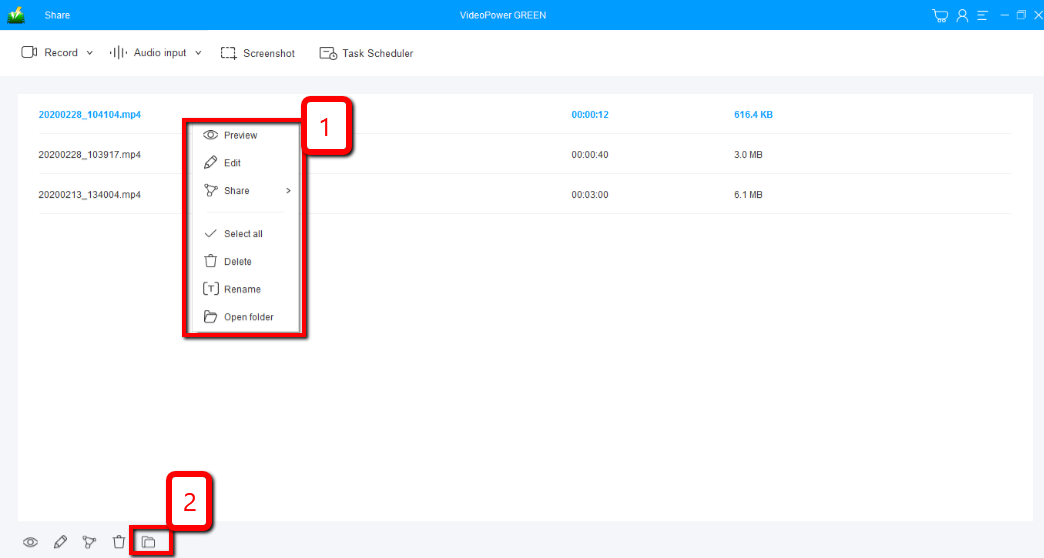
After that, the recorded file is already saved in the pointed output folder.
1) Your recorded file can be seen in the main interface. You can right-click the file and do more operations if you like.
2) Click the folder icon to view it in the pointed output folder.
Conclusion:
This software is a multi-faceted software that is simple, easy-to-use and straightforward. The functions in VideoPower GREEN are built-in video editor that will enable you to edit slideshows or videos, apply watermarks, effects, and other basic video editing options such as trimming or cropping.
The editor extension for this software could merge multiple files into one. It could convert audio and video files to your desired format or specific device compatibility.


