





Tips Index
You’re a working person with a pet left every day at your home and you always want the best for your pet but the thing is you’re away from home and you need to check whether your pet is okay. You definitely hired a pet sitter but you’re not sure if your loved one is being taken care of, fed well, and being looked out for safety in every corner. You’re now a worrier on what would happen if things are not in the safe zone. You can’t do anything since you’re at least more than 5 kilometers away from your home and you’re out of control. You constantly check your pet guardian for updates, but is that enough?
People have been installing web cameras in their homes so that they can monitor their pets, or even just monitoring their house. Pet surveillance camera paired with a trusty software makes it sure that your home has evidence on every motion there is, protecting your pets from abusive day guardians and keeping you updated whether your loved one is in good hands.
VideoPower GREEN is a powerful surveillance software that records your home through installed web cameras that is connected to your personal computers. It can start the record on its own through pre-scheduling your surveillance. It is the best pet camera for cats and dogs software.
Schedule a screen recording
Step 1: Open best pet monitor app
After opening the software, click “task scheduler”.

Step 2: Set-Up the Task Scheduler
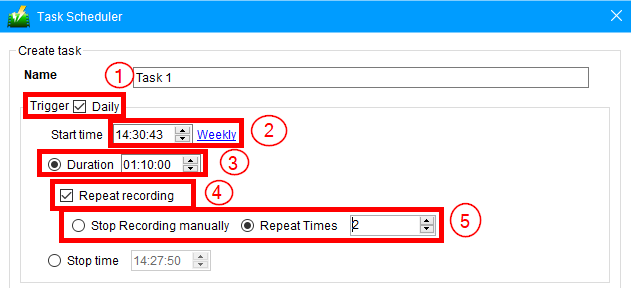
2.1 Edit recording frequency
1) Since this is a surveillance monitoring, tick check on the box “Daily”.
2) Set the time of the day when you want your pet to be monitored.
3) Set the duration of the surveillance monitoring.
4) Set the “Repeat recording” feature if you want to cut the surveillance after a specific amount of time and repeat it again with the same duration.
5) Click “Stop Recording manually” or “Repeat Times” either if desired.
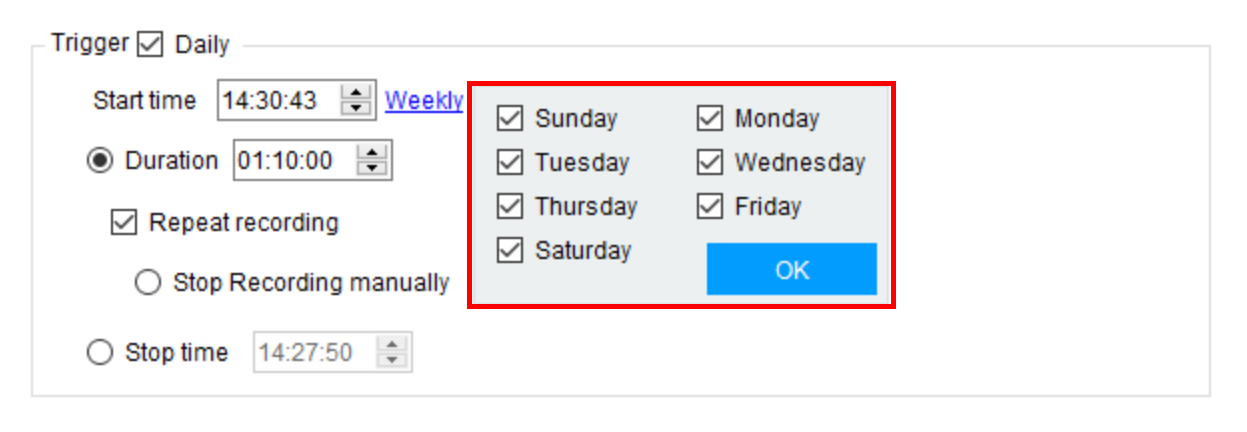
You can also set the specific days of the week you want to monitor.
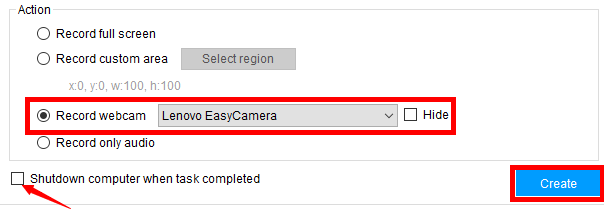
2.2 Start your pet surveillance camera
To monitor your baby and pets, click “Record webcam” and make sure the web camera is connected directly to your computer and click on the desired webcam available.
Tick on the “Shutdown computer when task completed” if you want your computer to automatically shut down both surveillance and the system. To finish the task click “Create”.
Step 3: Check the task list
After clicking “Create” the task will be transported to the task lists and enlist your desired actions for surveillance monitoring.

Conclusion:
VideoPower GREEN is a very versatile software, more than just the best pet monitor app it is also built to record screens and audios, edit your videos, and have a webcam recording feature that enables you to do tasks efficiently.
You can create several projects from this software, from video tutorials to screen capture directly from your display. More than your basic monitoring, it has multiple features that could be more than just monitoring your pet, it stretches beyond what is to offer.


