





Tips Index
Remarkably Google has made a solid and quality work in everything that they put their minds to. This is mainly the reason that the Chrome browser rapidly becomes one of the most famous and well-used browsers in the world today.
One particular thing that people seem to love about Chrome is the ability of it allowing users to edit the browser with themes and adding extensions to it. Since most people love is to watch online videos/streams.
I know lots of people that love to watch online videos like me, so I appreciate Google for bringing this to our stead. The most interesting part is that it has lots of alternatives for us when it comes to options ready to use Chrome download flash.
Streaming video is very amusing, but not so much of inconvenience when you always bank on to the internet connection or using diverse streaming sites to search for videos, imagine each with its different playlists, passwords, and apps that consume data and will make your internet slow.
So downloading videos is the best solution. There are tons of online tools and Chrome Extensions downloader that let you download videos from popular sites but online downloaders are not reliable and have malware issues.
VideoPower RED is one of the most amazing software with a built-in browser along with IE, Chrome, Firefox, Safari, IOS, and Android. You can enter a video URL to download the video of any kind from different video sharing site, you can also stream while downloading.
You have a lot of choices about the video format (MP4, AVI, FLV, 3GP, MOV or WEBM) with that said, VideoPower RED is easy very intuitive, practical, doesn’t ask for any permissions and it can convert videos into audio.
Follow through the steps to experience the best video downloader for Google Chrome.
You can try to use the software for free by downloading its trial version below.
Method 1: Copy and Paste
Step 1: Paste URL and download video
Copy the link of the video that you want to download from your browser and then paste it into the program by clicking the “Paste URL” button. After that, you will see the video is downloading in the download section.

Step 2: Check the downloaded file
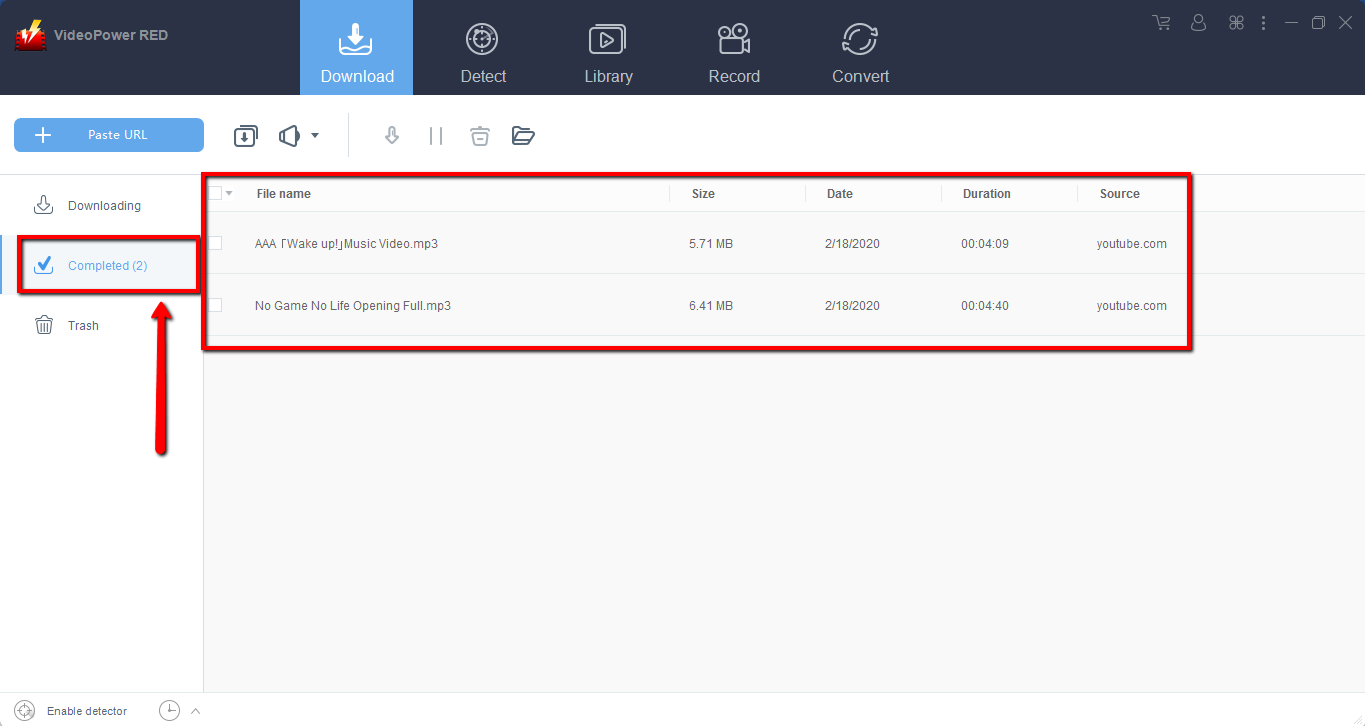
Wait for the download to finish, and then go to the “Completed” section to find the downloaded video.
Method 2: Use the Embedded Browser
Embedded Browser
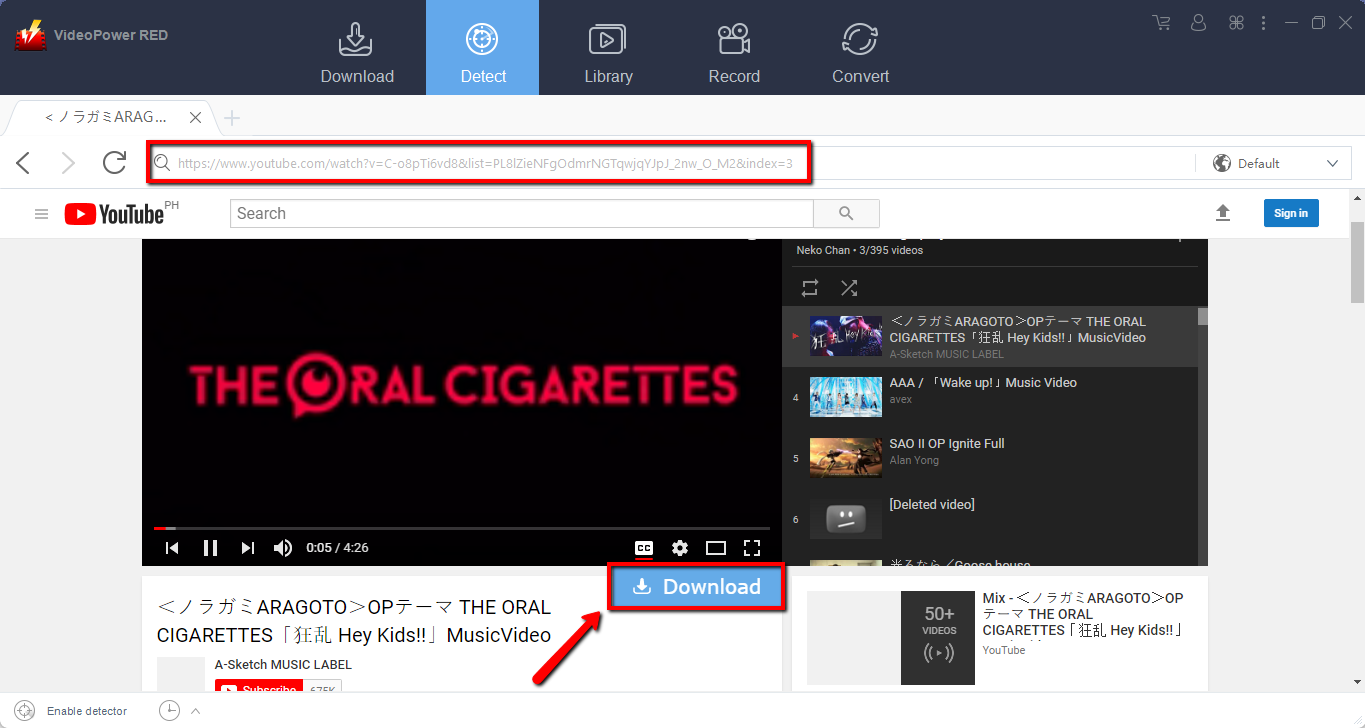
Open the video page via an embedded browser.
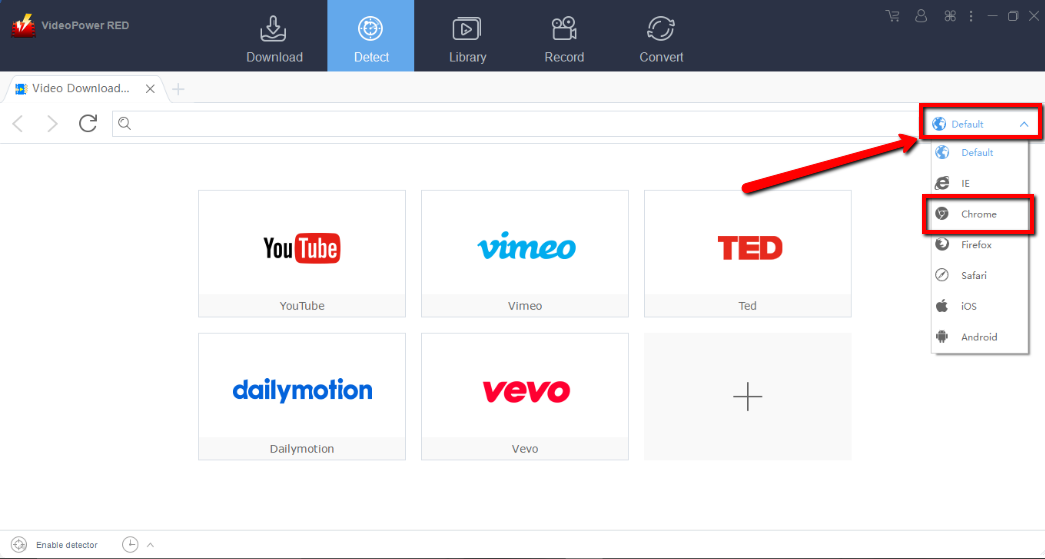
2.1 Set the browser to Chrome
Change the browser by clicking the “Default” bar and click “Chrome”.
If the program supports the site, the video will be downloaded by clicking the download button below.
2.2 Check the downloaded file
Wait for the download to finish, and then go to the “Completed” section to find the downloaded video.

Method 3: Record video
Sometimes because of the web update or slow internet connection, the program can’t download the video anymore but you can still save the video by using the recording function.
Step 1: Record video
Click the “Record” tab to record the video and Select from “Region, Fullscreen, around mouse or Web camera” as preferred.

Step 2: Check the recorded video.
After recording, the recorded file can be seen in the record interface.

Conclusion:
Google Chrome is the world’s number one web browser and compatible with almost all platforms. When watching stream videos on Chrome, you may want to save them on your computer. How to download videos from Chrome?
Introducing VideoPower RED, one of the best Chrome video downloader that can download videos from any video sharing site including Facebook, YouTube, Vimeo, Vevo, Dailymotion, TED and many more. Experience the powerful app with unbelievable satisfying results. Enjoy watching Full HD quality, 4K quality, 3D quality, HD quality or Standard quality. Download now.


