





Tips Index
Vevo is the world’s largest all-premium music video provider, offering artists a global platform with enormous scale through its distribution partners.
The platform seeks joint ventures with other sites to provide their audiences with HD music videos, live performances, interviews, and more.
Any artist – signed or unsigned – can deliver premium music video content through Vevo. The provider called Vevo is the largest network of music channels on YouTube, with more than 450,000 videos from artists of all levels and genres.
Vevo now distributes its video mainly on YouTube, while their app is available on the selected DVRs and game consoles.
Are you one of those people who wants to download Vevo music videos for free? Are you in a search for the right and trusted Vevo downloader? A Vevo downloader mp4 format converter?
Well, today is your lucky day, because in this article we have the solution to your problem. Introducing VideoPower RED, it is a powerful video downloader that lets you download videos from different kinds of video sharing sites including YouTube, Tumblr, Facebook, Vimeo, Dailymotion, Twitch, YouTube, Etc. This product is suited as the best Vevo downloader.
Just click the link below to download this free app and follow through the simple steps on How to Download Videos from Vevo.
Video Evolution or also known as Vevo is a multinational American video hosting service found on June 16, 2009. The concept of Vevo was described as being a streaming service originally for music videos with the objective to attract more advertisers.
The platform of Vevo after the air is kind of similar to the Hulu streaming service for movies and TV shows. The site’s other earning sources including a merchandise store and a referral to purchase songs viewed on Amazon Music and iTunes.
Vevo has spread the news that they were going to shut down its consumer website and are going to remove its app from mobile phone platforms on May 24, 2018. Vevo now distributes its video mainly on YouTube, while their app is available on the selected DVRs and game consoles.
Are you one of those people who wants to download Vevo music videos for free? Are you still searching for the right tool to download Vevo videos?
Well, today is your lucky day, because in this article we have the solution to your problem. Introducing VideoPower RED, it is a powerful video downloader that lets you download videos from different kinds of video sharing sites including Vevo, YouTube, Tumblr, Facebook, Vimeo, Dailymotion, Twitch, etc.
Just click the link below to download this free app and follow through the simple steps on how to download videos from Vevo.
Method 1: Copy and Paste URL
Step 1: Copy and Paste URL then download the video.
Copy the link of the YouTube video that you want to download and then paste it into the program by clicking the “Paste URL” button. After that, you will see the video is downloading in the “downloading” tab.

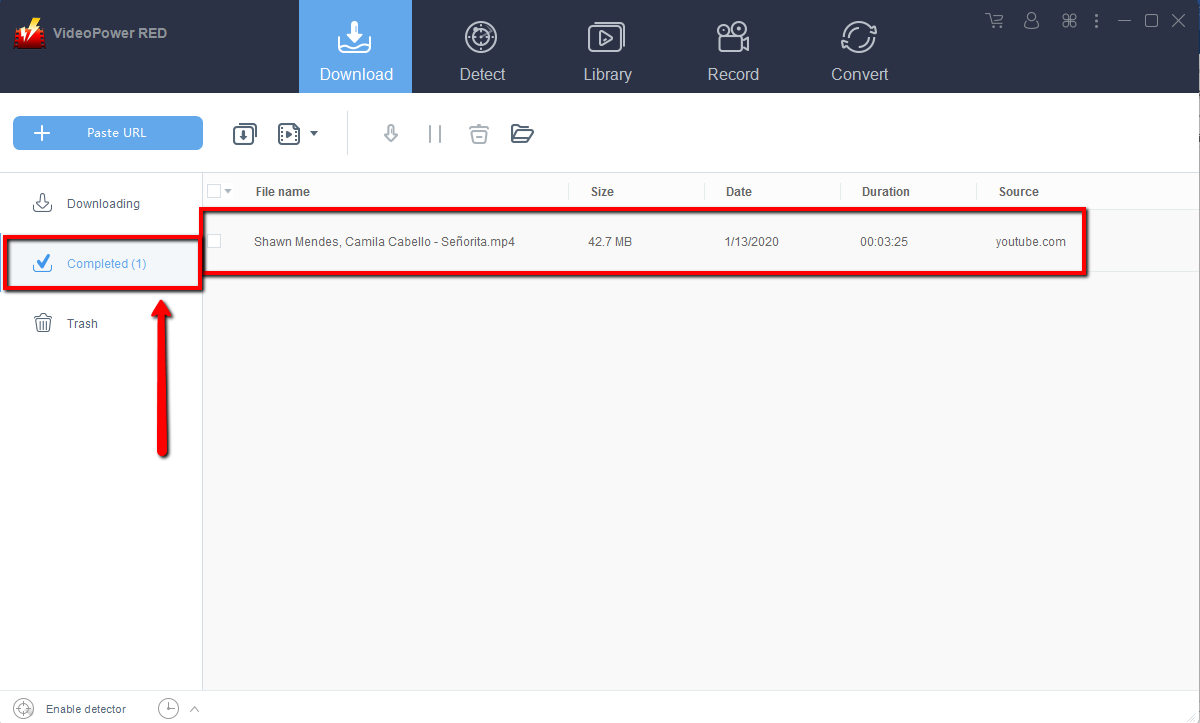
Step 2: Check the downloaded file
Wait for the download to finish, and then go to the “Completed” tab to find the downloaded video. Right-click to do more operations and double-click to preview.
Method 2: Use the Embedded Browser
Vevo distributes mainly via YouTube, when you open Vevo.com and click “Watch Now” , it will redirect you on their Vevo channel on YouTube.
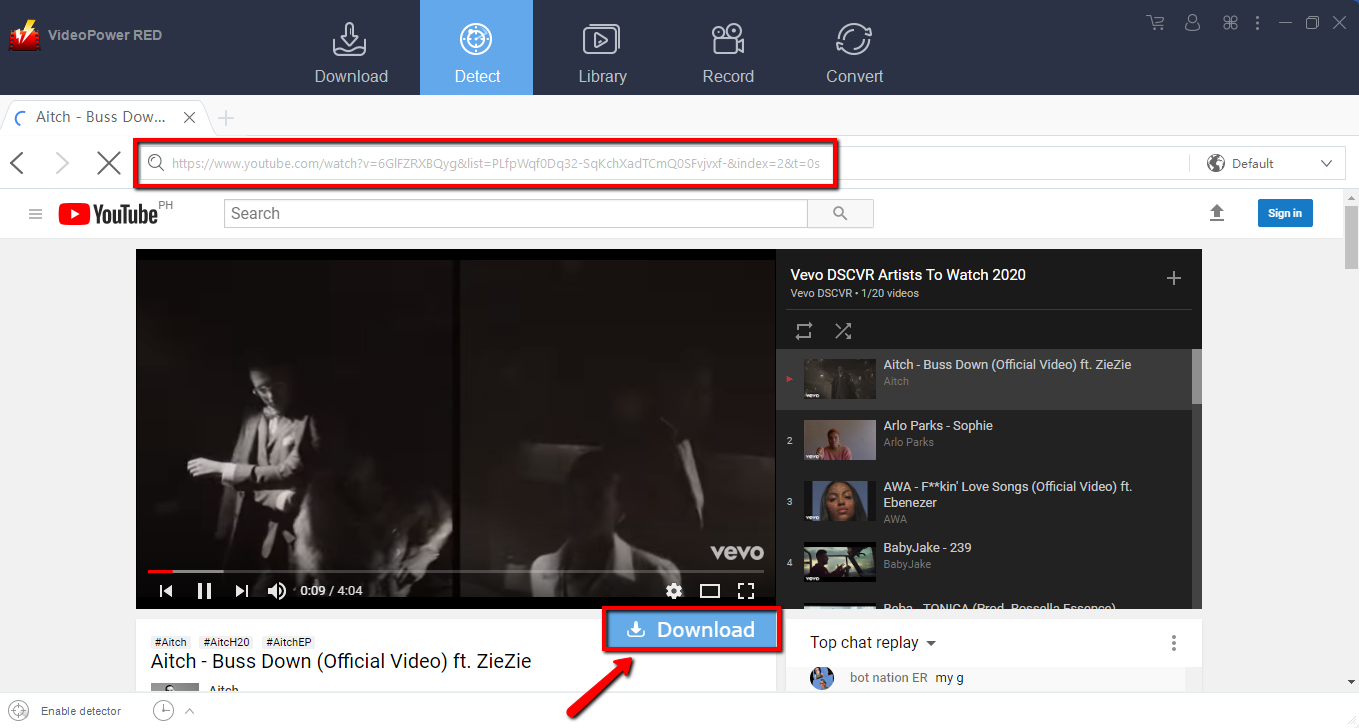
Step 1: Open the video page via an embedded browser
If the program supports the site, the video will be downloaded by clicking the download button below.
Step 2: Download Complete
Wait for the download to finish, and then go to the “Completed” tab to find the downloaded video. Right-click to do more operations and double-click to preview.

Method 3: Record the video
Sometimes because of the web update or slow internet connection, the program can’t download the video anymore but you can still save the video by using the recording function.
Step 1: Start Recording
Click the “Record” tab to start recording the video. Select from the given modes such as “Region, Fullscreen, around mouse or Web camera” as preferred to capture the desire location.

Step 2: Check the recorded video
After recording, the recorded file can be seen in the record interface. Right-click to do more operations and double-click to preview.

Conclusion:
VideoPower RED downloads videos in HD quality and has faster downloading speed results. The software is totally perfect for you. It’s fast and flexible when it comes to downloading and has a built-in video editor that will enable you to merge multiple videos into one single file. Aside from downloading and conversion, this software will allow you to edit slideshows or videos, apply watermarks, effects, and other basic video editing options such as trimming or cropping.
Moreover, it has a split-screen tool for your photos and videos and a screen recorder which allows you to capture any on-screen activity on your computer.


