





Tips Index
Viber is a cross-platform network telephone and instant messaging application for mobile phones and computers running Mac, Windows, Linux, and Android operating systems. When connected to the Internet, users can interact with other users through free text messages, voice calls, video calls and sharing funny emojis and video clips.
Viber is one of the most used platforms of communication in the world. Whether it’s for work or catching up with friends. Also, with its great feature of a video call, users can communicate with people for presentations, training, teamwork, business negotiation, and many other purposes.
Therefore, many people would want to record Viber calls for their own use such as taking important notes, saving important information and reviewing details from the call.
But the question is, what would be the best and trusted recording tool for it?
VideoPower GREEN – an easy to access and powerful application software that would be the best and the fittest answer to this question.
Download VideoPower GREEN by clicking on the link below.
Step 1: Record screen activities.
Run VideoPower GREEN if you have installed it on your PC.
Choose a sound source.
You can choose “System sound, Microphone, System sound, and microphone or None.” To record streaming video, you can select “System sound”.

Select a recording area.
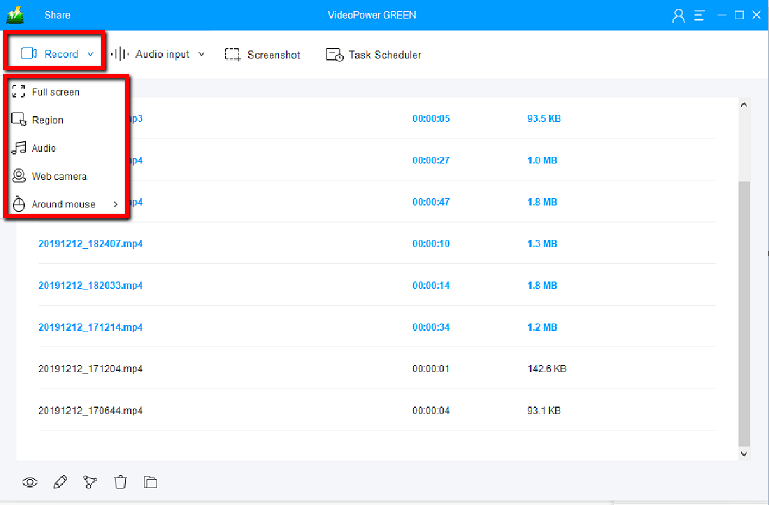
Click on the “Record” button to choose the recording mode from “Full screen, Region, Audio, Web camera, Around mouse”. Select the area you are going to record.
Step 2: Start to record.
The pop-up window will ask whether you are ready to start recording, click “OK” to confirm when you are ready to record.

Edit video while recording:
While recording you can add lines, arrows, shapes, texts, highlight, blur, etc. by clicking the edit button.

Step 3: End the recording.
Click the “Stop” button to stop recording.

After that, the recorded file is already saved in the pointed output folder.
1) Your recorded file can be seen in the main interface. You can right-click the file and do more operations if you like.
2) Click the folder icon to view it in the pointed output folder.

Conclusion:
Recording, keeping and preserving important details and information from a Viber call on PC is a bit of a problem. But then, it is not that impossible when you know what to use and when you have an exact application for it.
VideoPower GREEN is an easy to use and trusted application software would be the best answer for this kind of concern. It can help users to take footage of their Viber activities most especially those important ones that they wanted to keep for later use.


