





Tips Index
Google officially launched its unified cross-platform chat software Hangout at the I/O conference. Computer, Android and iOS users can use it for free, supporting text, pictures, expressions, videos, one-to-one, and multi-people chat.
Google Hangout makes chatting livelier and interesting – you can send pictures and have a video group chat. Also, it is completely free whether it is one-to-one or multi-group chat.
Using Google Hangout communication software is surely amusing but its less fun without someone to share with. Thus, many users wanted to record their Google Hangout activities. But the question is, what would be the best tool for it?
VideoPower GREEN, a powerful and trusted recording application software is best for recording Google Hangout video and audio chat. With the help of this product, you can rewatch your meetings, take notes important details and replay it anytime and anywhere you want.
You can try to use the software for free by downloading its trial version below.
Step 1: Record screen activities.
Run VideoPower GREEN if you have installed it on your PC.
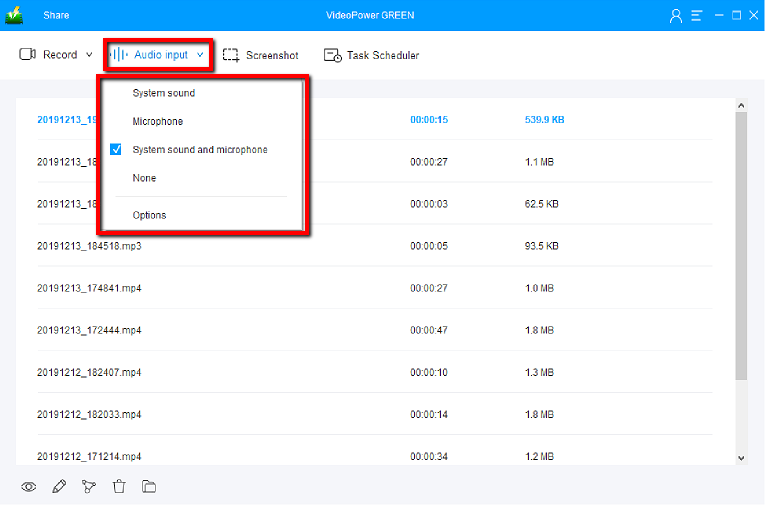
Choose a sound source.
You can choose “System sound, Microphone, System sound, and microphone or None.”
Select a recording mode
Click on the “Record” button to choose the recording mode from “Full screen, Region, Audio, Web camera, Around mouse”. Select the area you are going to record.

Step 2: Start to record.
The pop-up window will ask whether you are ready to start recording, click “OK” to confirm when you are ready to record.

Step 3: End the recording.
Click the “Stop” button to end the recording.

After that, the recorded file is already saved in the pointed output folder.
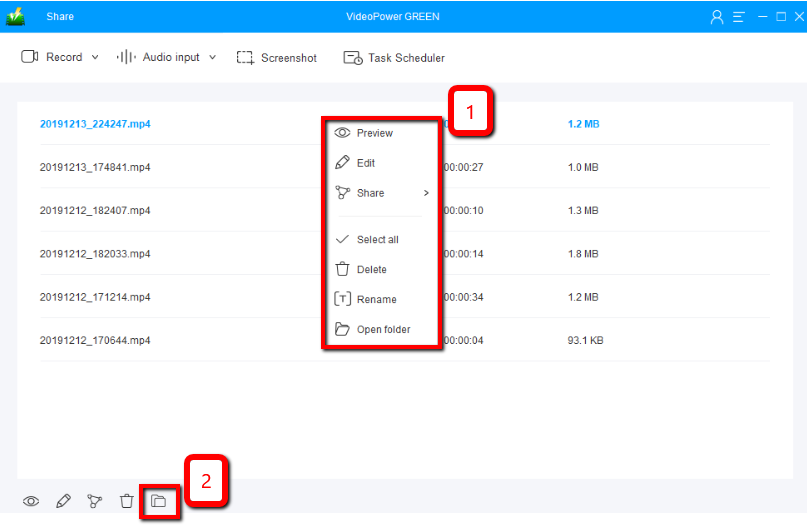
1) Your recorded file can be seen in the main interface. You can right-click the file and do more operations if you like.
2) Click the folder icon to view it in the pointed output folder.
Conclusion:
Google Hangout communication software is another kind of communication site that is surely amusing but of course less fun without someone to share with. Sharing the content of what happened online is troublesome. Screen recording is the only way that would be best for it.
VideoPower GREEN, an easy to use, hassle-free and trusted recording application would be an awesome tool to record google hangout activities. It wouldn’t only record the moving visual images from the google hangout communication site but also the supporting audio coming from it.
This product doesn’t only save your hassle in recording the audio and video but it also beautifies the recordings by using its editing feature. It can also help you save some time and effort by setting its task scheduler feature.



