





Tips Index
The gaming world is already in sync with the real world. Many play online games and they are also encouraged to shoot a video of it. One of these games is Roblox.
Roblox, the world’s largest multiplayer online game creation platform has 300,000 game developers and 15 million users-developed games on it covering all types of games, from sports games to role-playing games.
With the advent of the internet and streaming platforms, gaming content creators have been emerging everywhere and their numbers are growing. Roblox VR quality would be the basis to rise in this kind of situation. VideoPower GREEN will help you with that. It is a powerful and trusted recording tool. You can record Roblox content which includes all sounds from different sources.
Step 1: Set up settings before recording roblox gameplay
Choose a sound source.
You can choose “System sound, Microphone, System sound and microphone or None.” To record gameplay, you can select “System sound and microphone”.

Select a recording area.
Click on the “Record” button to choose the recording mode from “Full screen, Region, Audio, Web camera, Around mouse”. Select the area you are going to record.

Step 2: Start to record roblox gameplay
The pop-up window will ask whether you are ready to start recording, click “OK” to confirm when you are ready to record.

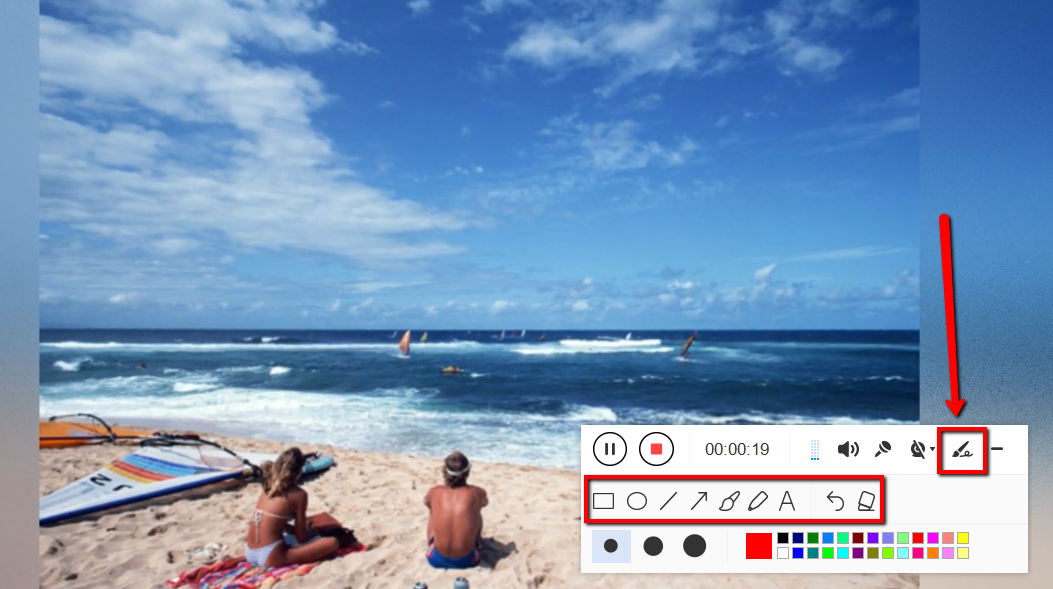
Edit video while recording:
While recording you can add lines, arrows, shapes, texts, highlight, blur, etc. by clicking the edit button.
Step 3: End the recording of your roblox gameplay
Click the “Stop” button to stop recording.

After that, the recorded file is already saved in the pointed output folder.
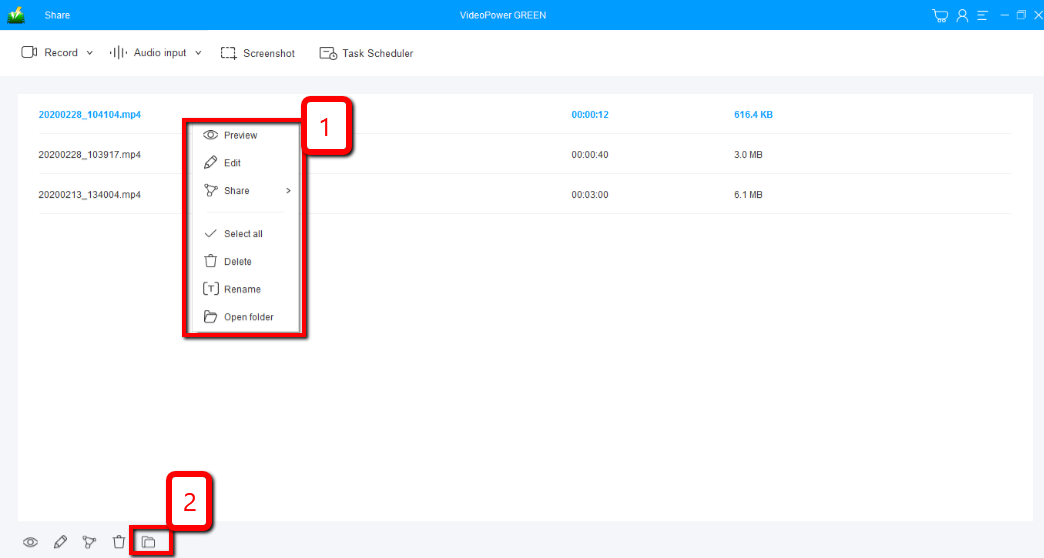
1) Your recorded file can be seen in the main interface. You can right-click the file and do more operations if you like.
2) Click the folder icon to view it in the pointed output folder.
Conclusion:
Roblox is an all timed multiplayer online game and creation system platform in the world where technologies are already being developed. This game allows users to design their own games and play a wide variety of different types of games created by other users.
Many online gamers are now in connection with this game because of their different purposes of playing this game. Many of them play Roblox to be entertained and to kill some time. There are also players who play this game to earn money by joining a tournament or competition and most especially by posting a video of their games online. But the question is, how would they capture a video of it?
VideoPower GREEN, an easy to access and trusted application software would be the best answer for this kind of question. This will answer your concerns on how to share with other people the excitement, joy and the knowledge and skills that your game would offer. By just downloading and installing it, you will have a terrific video recording tool for your Roblox.


