





Tips Index
Vevo is a music video website and the second largest video site after YouTube.
It is a joint venture of Sony Music Entertainment, Universal Music, Abu Dhabi Media, and EMI to provide dividend-free licensed content.
There are tons of music videos for your entertainment on the Vevo website. Besides, you can save your favorite videos on the page for later viewing.
Most online streaming sites such as Vevo, do not feature a download option for offline viewing. Using VideoPower YELLOW, you can convert Vevo videos to MP3.
To download the free software, just click on the link below.
Step 1: Open “Video to MP3 Converter” Window
After you run the program, click the settings tab on the upper-right corner of the product interface and navigate to “Video to MP3 Converter” window.
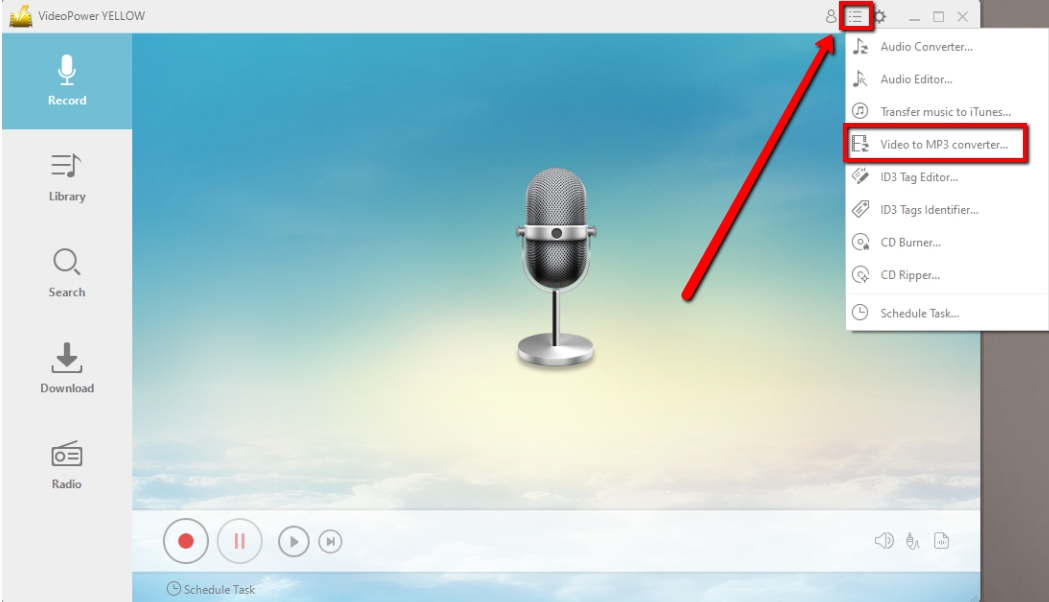
Step 2: Download Vevo Video to be converted to MP3
2.1 Copy Video URL
The built-in “Video to MP3 Converter” window will pop up, copy and paste the Vevo video URL that you want to convert.
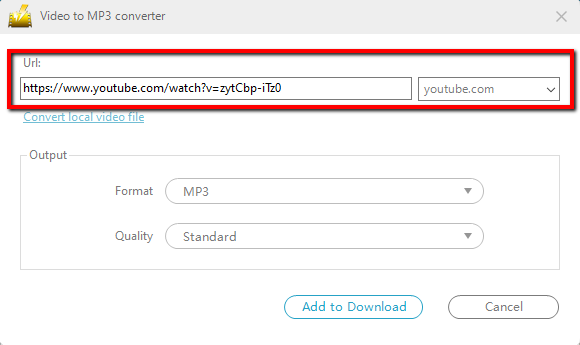
2.2 Set Output Format
You can set up the output format and quality in the “Output” portion, and then click the “Add to Download” button to start the conversion.
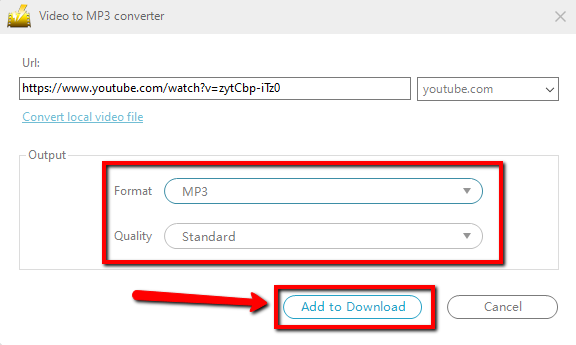
Step 3: Check the downloading and converting process.
Navigate to the “Download” feature. You will see the “Downloading” control panel has a task displaying on it. If complete downloading, find it in the “Completed” list.

Step 4: Task Completed
After the track has been downloaded, it will be transferred to the “Completed” downloads list. Click on the folder icon to locate the file folder destination of the track.

Conclusion:
Using VideoPower YELLOW is the easiest method to download videos to audio from sites that do not provide download features. Because of the emergence of online streaming sites, offline viewing has now become a thing of the past – but for some people that still opt to listen to their favorite music offline, using VideoPower YELLOW is a great choice.


