





Tips Index
Windows Movie Maker
It is the unfinished video editing software of Windows Essentials software that offers an ability to create and edit videos as well as to publish them on sites like OneDrive, Facebook, Vimeo, YouTube, Flickr, and etc.
It allows users to rapidly build a modified movie that includes videos, still images, background music, and narrations. Also, this software includes a feature that adds titles, transitions, and video effects for further customization.
iMovie
It is the video editing application software developed by Apple Inc., especially for macOS and iOS devices. With iMovie, Apple users can enjoy movies, clips, and shows their desire. Moreover, this app allows users to edit videos in a high-quality resolution output.
Windows Movie Maker vs iMovie
Video editor software serves a wide range of demands on video editing. People nowadays have natural desire and interest in adding their clips some effects before uploading to one of the popular video sharing sites of their choice. There are two best movie makers and basic video editors that users used to modify and beautify their videos, the Windows Movie Maker and the iMovie. Both of the application software keeps their usability and effectiveness as their leading traits.
However, Windows Movie Maker does not offer as many editing options like iMovie. It can only have one video track and users cannot use green screen footage in this product. As a result, users are limited to the effects installed in the program.
Both of the software aren’t good enough like other big software online. But, to improve users’ experience in editing, modifying, and beautifying video files, a third-party tool or a movie maker alternative that can cater to most of the users’ plan and desire is needed.
Best Alternative
VideoPower BLUE is definitely amazing, trusted and useful third-party application software recommended for users that call for the best experience towards a movie-making activity. This product is the best Movie Maker – iMovie Alternative that offers the finest experience in movie making where users can add themes and music to their file. Users can also export it to their desired video quality. Moreover, this product possesses various professional features that can help users to enhance and glamorize their videos such as converting with editing features, split-screen with different styles, and filters that match users’ tastes and the recording feature that allows users to record either audio or screen or even both.
Start Movie Making and Video Editing
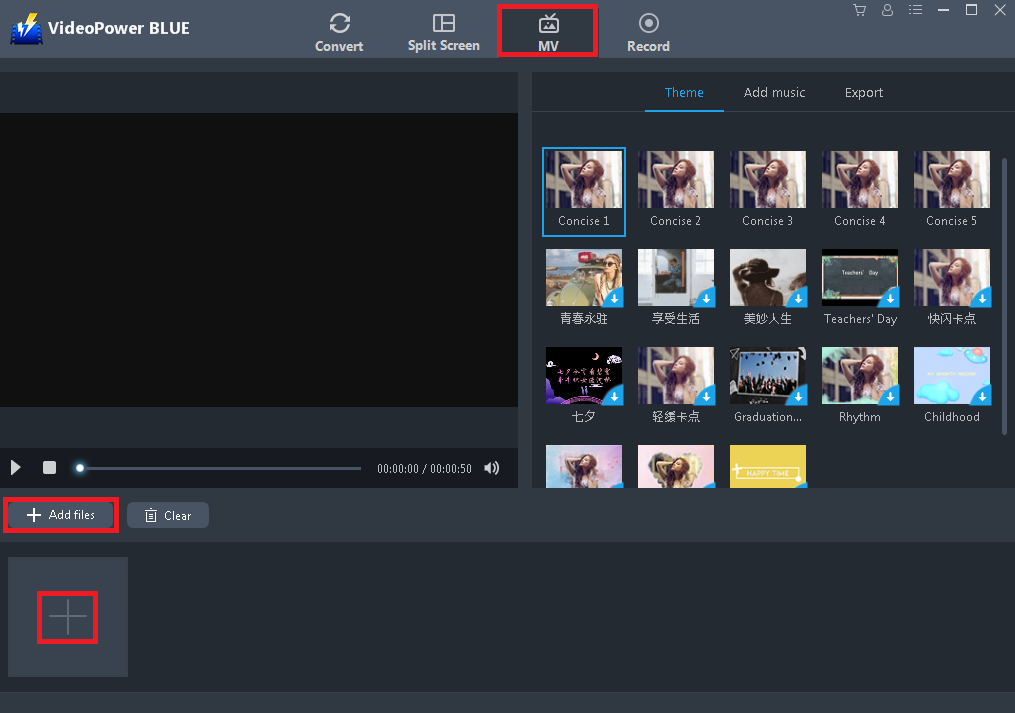
Step 1: Import Videos or Images
Navigate to MV window and import desired video and image files. Click the “+” button or “+ Add File” button to select files saved locally.
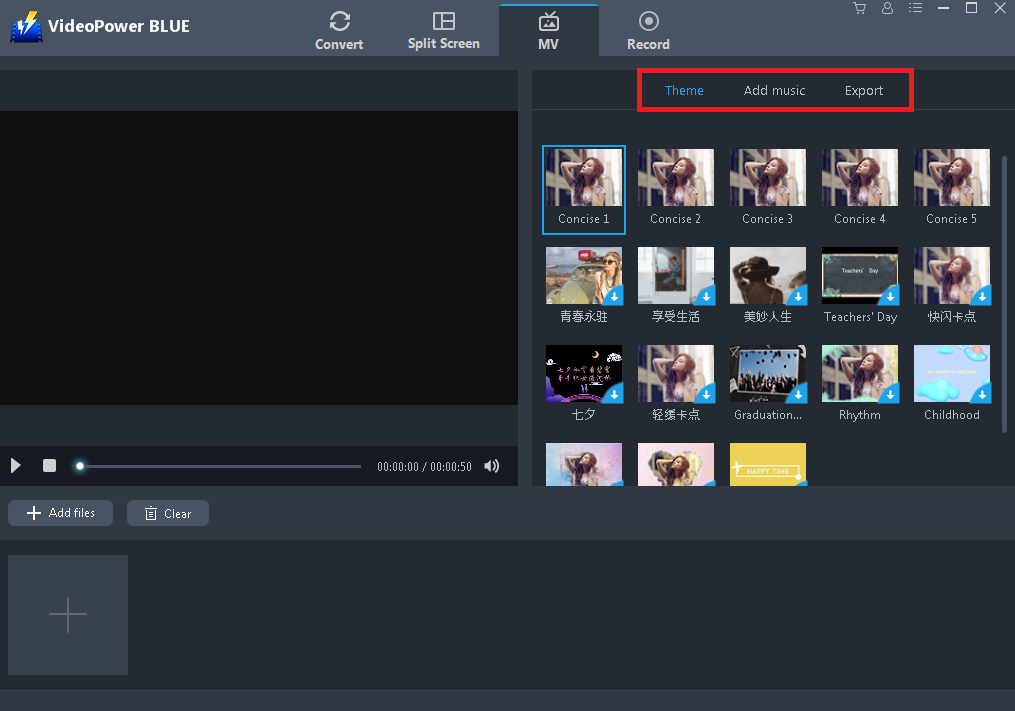
Step 2: Set the Theme, Add Music and Export
Choose the desired changes to the added files. Set the theme, add music, and export to a higher quality that best suited for the expected file output. Setting up the desired volume is also possible.
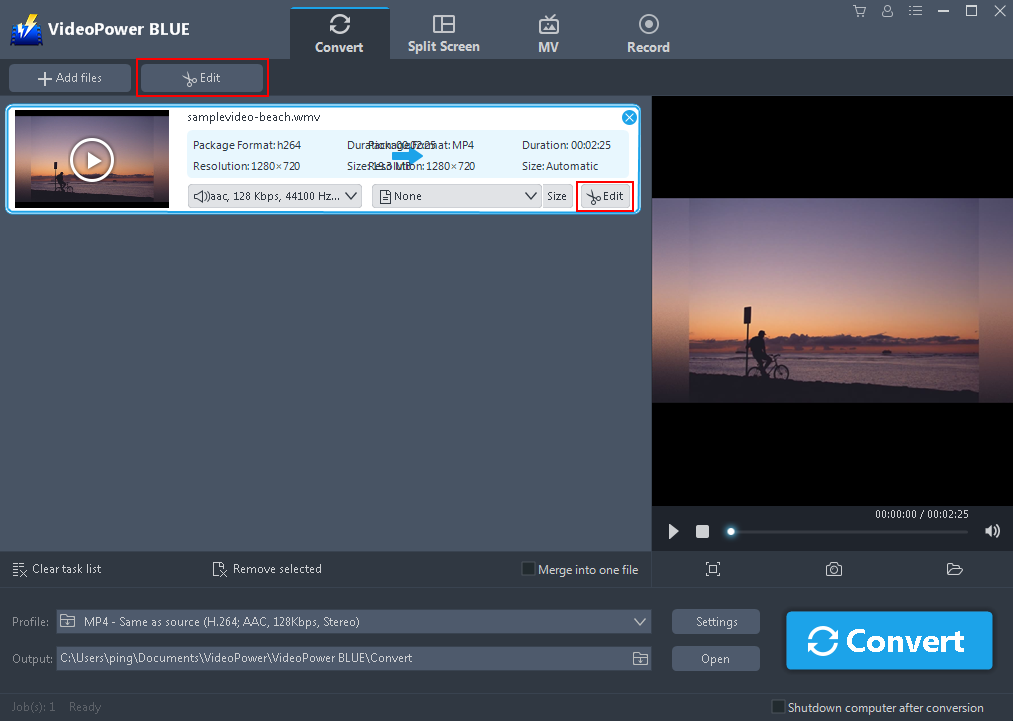
Step 3: Edit Video
*This step is optional, users may edit the video or not.
Users can edit the video by trimming, adjusting the size and position, managing the effects, and adding watermark and subtitle. To do so, click the “Edit button” after adding the video in the convert window.
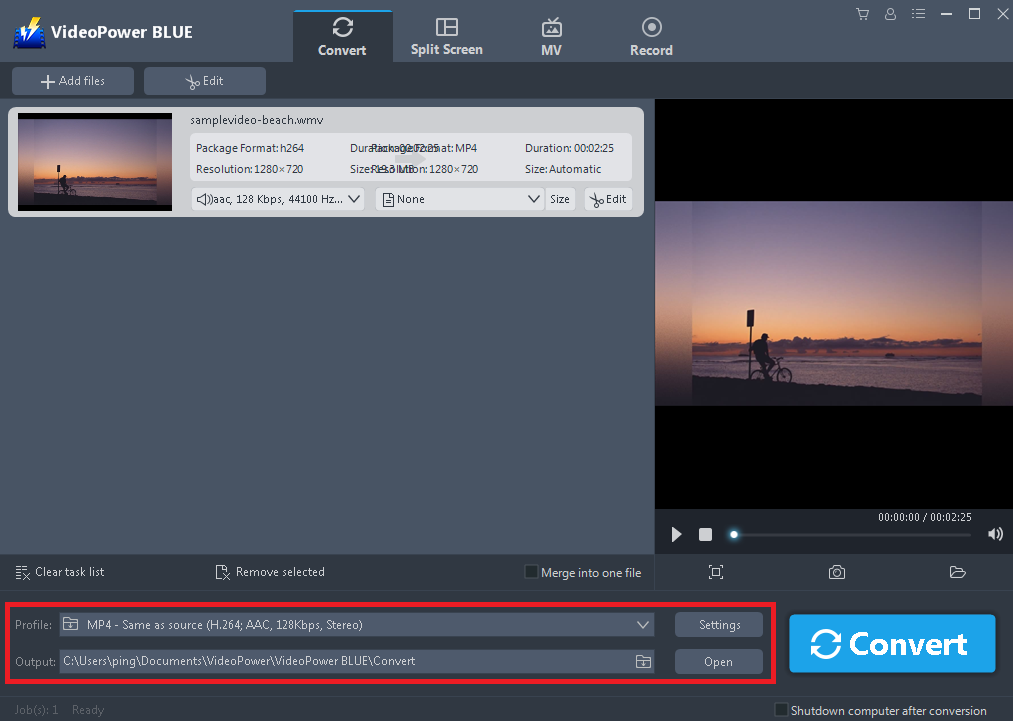
Step 4: Set Profile and Output Format
*This step is optional, users may change the format and quality of the video or not.
After editing the video, users may set the desired formats and other settings to enhance the quality of the video. To do so, click the “Profile” and “Output” search box, and the “Setting” button one at a time to set the desired quality and format for the video.
Step 5: Convert Video
After setting up the desired output format for the video, convert it to finalize. To do so, click the “Convert” button.

Conclusion:
Because of the development of digital applications and technologies nowadays, users’ thoughts have become more creative and imaginative that brought them not only to watch streamed online videos but also to make videos on their own and modify them through editing.
This thought isn’t actually impossible. With the use of the MV feature of the third-party tool called VideoPower BLUE, movie making is obviously possible. Moreover, this product isn’t only useful in making videos but it is also best in its editing feature that can help users modify and beautify the content of the video.
In addition, this product also has more various amazing features such as converting, split-screen, and screen recording. This product is indeed the best movie maker alternative that users will ever have.


