

Tips Index

Nowadays, many things are going through humans’ minds that helped the digital world to develop and evolve into its new and amazing aspect. As digital technologies and applications continue to advance as anew, web content isn’t left behind too. In fact, one of these is the video game music and soundtrack downloader app.

Because of this, users wanted to download their desired video game music and soundtrack for different personal purposes.

However, video game music is as important as its characters and storyline. Nowadays, game developers tend to put complexity in background music, such as a full orchestral piece that goes with the player’s movement and achievement.

Even so, with a third-party audio recorder application software called VideoPower YELLOW, recording game music and the soundtrack is possible and easy. VPY app isn’t only amazing, hassle-free and trusted but also has various professional features that can support users’ recording needs.

You can try to use the software for free by downloading its trial version below.

FREE DOWNLOAD

Windows 7 / 8 / 8.1 / 10 supported

Method 1: Audio Recorder

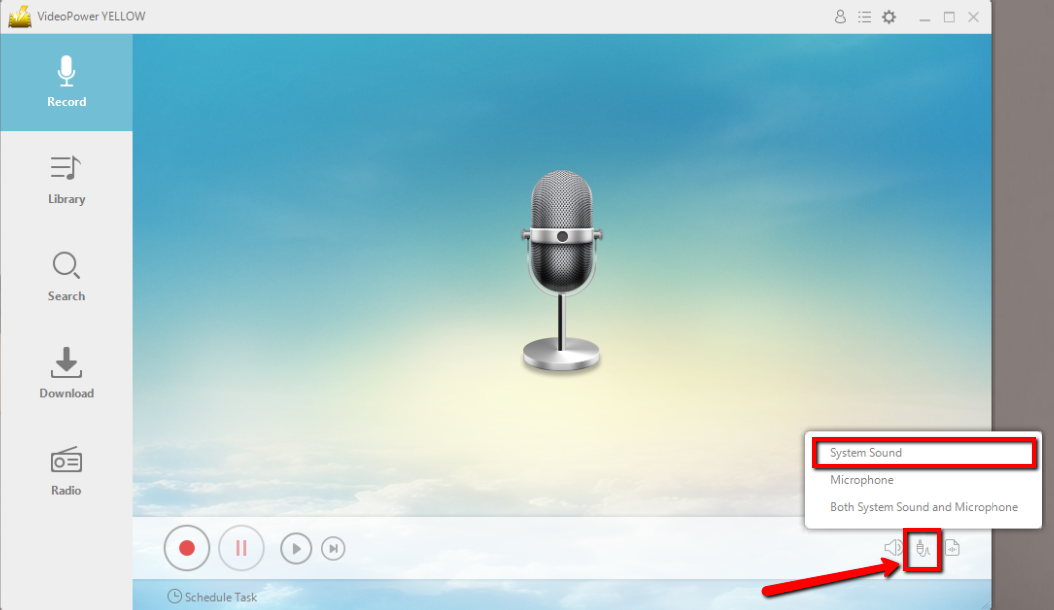
Before recording, make sure that the sound resource you chose is “System Sound”.
Youtube audio recorder, The best Music downloader, VideoPower Yellow

Click the start recording button at the bottom left of the screen and click the same button to stop when you are done recording.

Youtube audio recorder, The best Music downloader, VideoPower Yellow

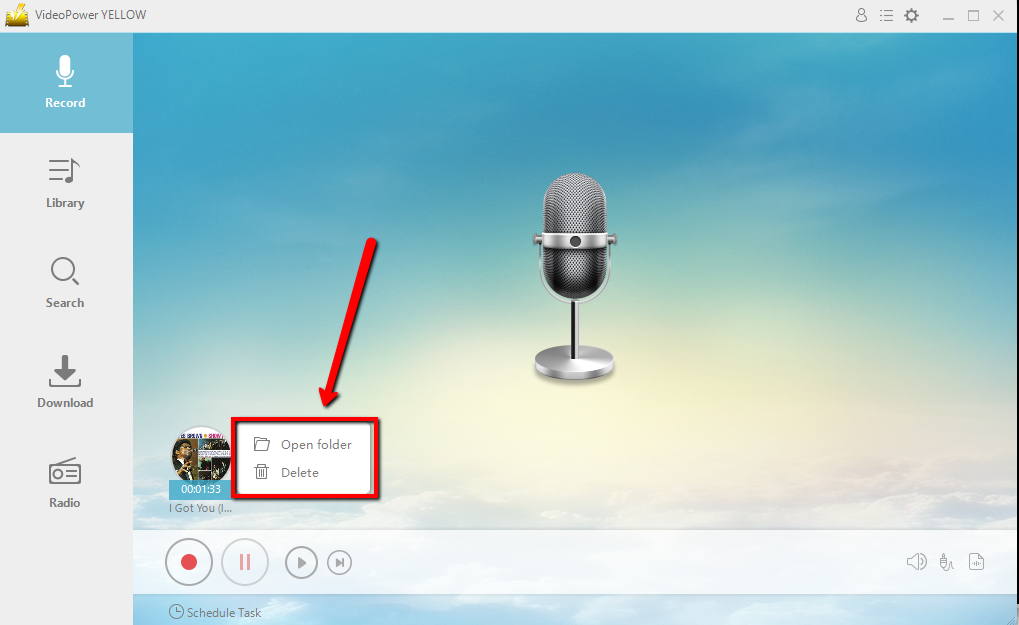
After recording right-click the recorded track icon and click “Open folder” to open the storage location of the recorded audio file.
Youtube audio recorder, The best Music downloader, VideoPower Yellow

Method 2: Scheduled Task Audio Recorder

If you don’t have time to sit in front of the computer and keep waiting for the recording to end, this setting is for you.

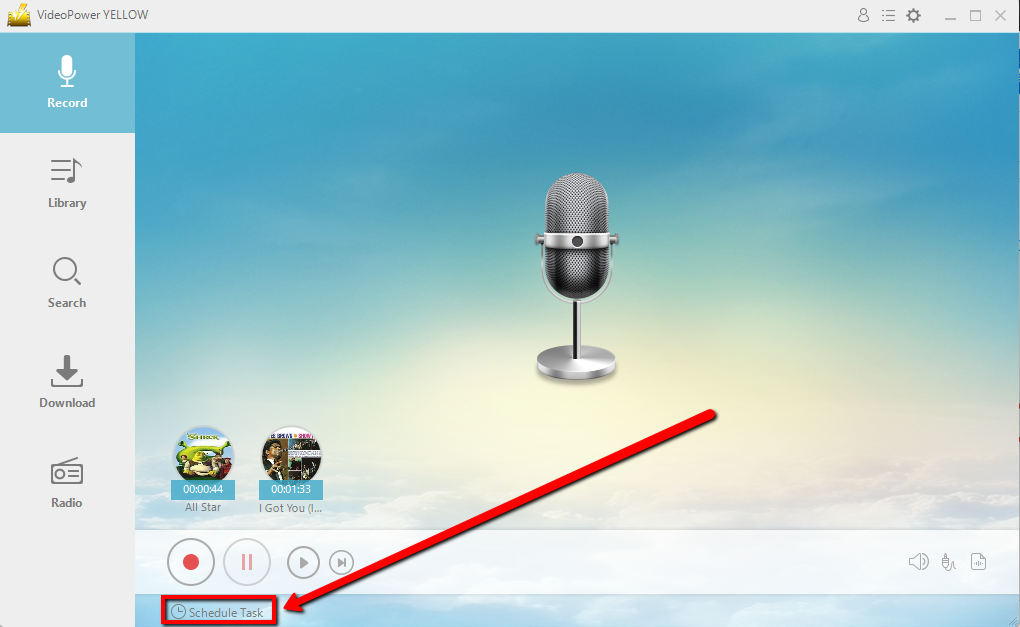
Click “Scheduled Task” at the lower left of the main interface.
Youtube audio recorder, The best Music downloader, VideoPower Yellow

Create a task and Set the start and end time as preferred. Click “Ok” to save the task.

Youtube audio recorder, The best Music downloader, VideoPower Yellow

Conclusion:

VideoPower YELLOW provides the easiest way to download music. This is a powerful and stable software that offers more than just downloading.

It also supports converting and recording music. If you need to rip or burn music to a CD, it can also meet your needs.

Related Posts

Video Download
Record
Convert

VIDEO POWER

RED

  • Download video and audio from over 1000 video site
  • Batch download YouTube playlist
  • Record screen and audio with real-time annotation
  • Trim, crop, rotate video with a strong video editor
  • Windows 7, 8, 8.1, 10 (32/64bits)
> DOWNLOAD <
LEARN MORE

Schedule Recording
Annotation
Video Edit | Convert

VIDEO POWER

GREEN

  • Record screen and audio with real-time annotation
  • Create a scheduled task to record screen and webcam
  • Enrich your recorded video by powerful Video Editor
  • Capture and annotate your screen in the picture
  • Windows 7, 8, 8.1, 10 (32/64bits)
> DOWNLOAD <
LEARN MORE

Video Convert
Record
Slideshow Maker

VIDEO POWER

BLUE

  • Convert video and audio to various formats at super fast speed without quality loss
  • Make your own video clips or movies with fantastic themes
  • Transform multiple videos and photos in one frame as a collage
  • Trim, crop, rotate, effect, watermark, subtitle, etc. in video editing
  • Windows 7, 8, 8.1, 10 (32/64bits)
> DOWNLOAD <
LEARN MORE

Music Search
Download
Record

VIDEO POWER

YELLOW

  • Records music and audio from various sources in lossless

  • Search and download music

  • Auto-add music ID3 tags for recorded music

  • ID3 Tag Identifier and Editor, Audio Editor/Converter, CD Ripper/Burner, Transfer to iTunes, etc

  • Windows 7, 8, 8.1, 10 (32/64bits)

> DOWNLOAD <
LEARN MORE

Whatever fits your needs, it's here.
Which one would you choose?

> Video Power Series Comparison <